MCP Tool Explorer Supports MCP Apps: Protocol, Code, and the Fine Print
MCP Apps adds interactive HTML UIs to MCP tools. This post covers the protocol, the host implementation, and the sandbox constraints that only show up when you actually build it.
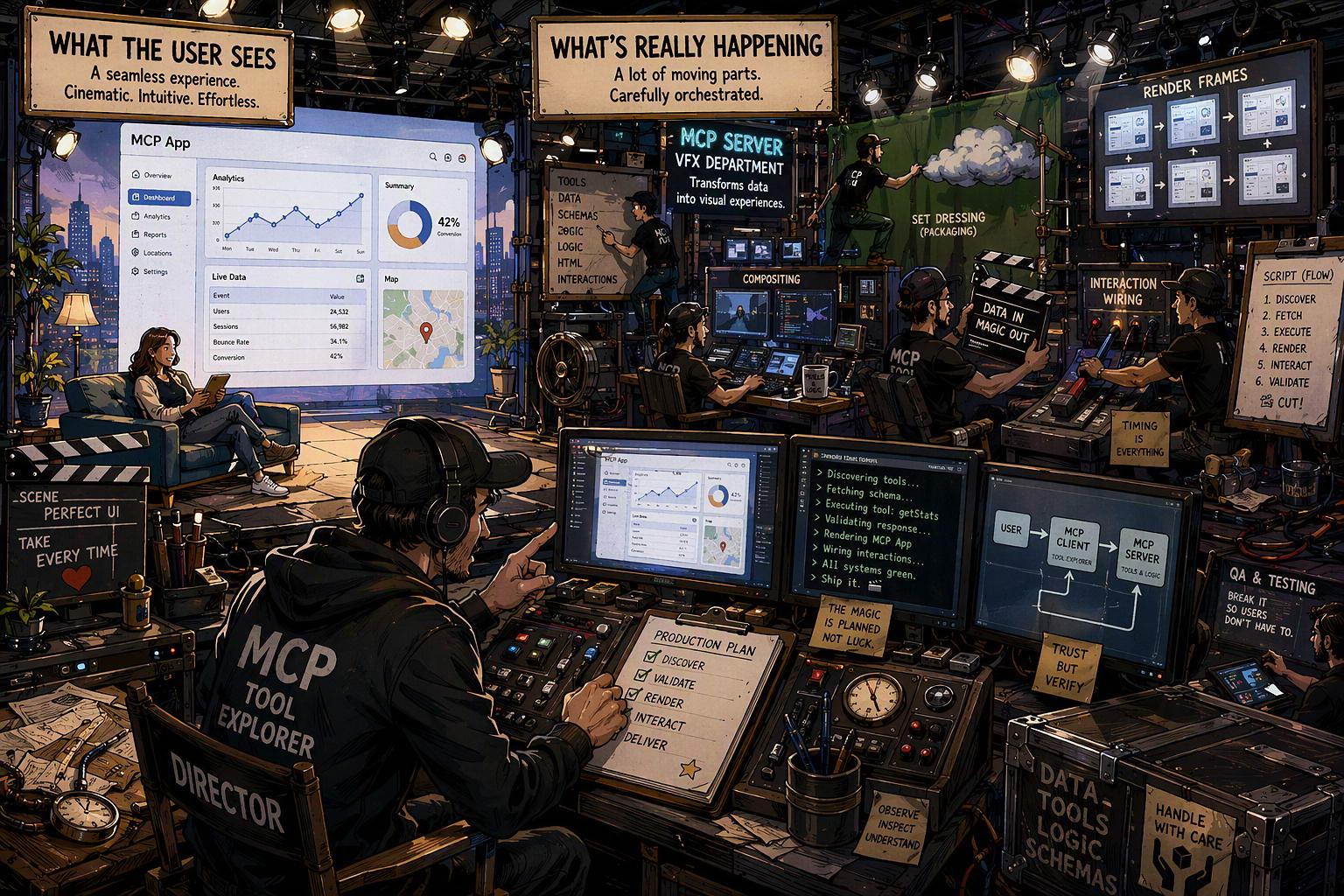
MCP Tool Explorer is a VS Code extension for exploring MCP servers: browsing tools, resources, and prompts, calling them, and inspecting results. With this update it also renders MCP App UIs inline, next to the regular result view.
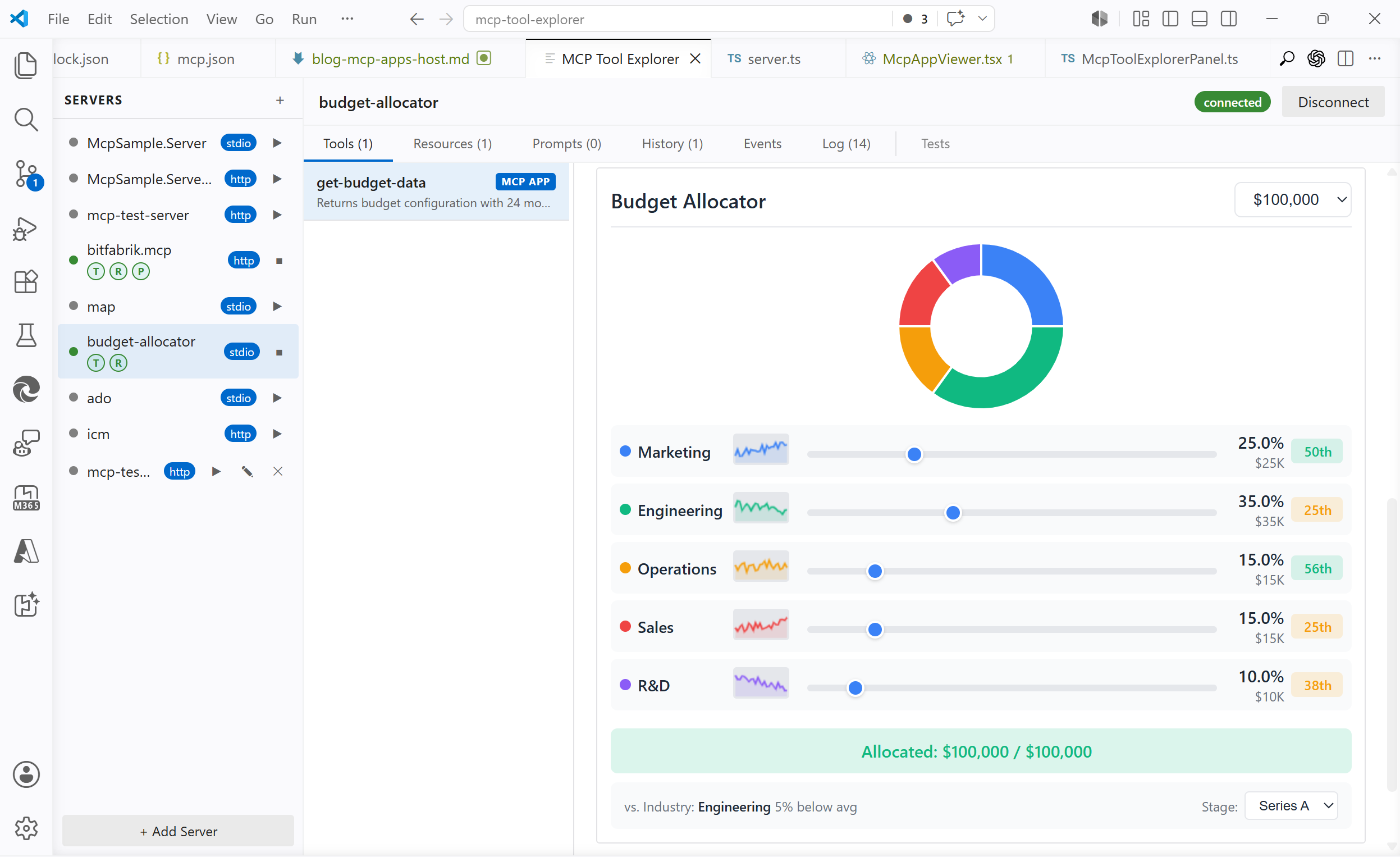
A few examples running inside the extension: one from the official SDK sample, five built as test cases.
budget-allocator (official SDK sample)
mcp.json
"budget-allocator": {
  "command": "npx",
  "args": ["-y", "@modelcontextprotocol/server-budget-allocator", "--stdio"]
},
Regex visualizer: parses a regex and renders an interactive token breakdown with optional match highlighting
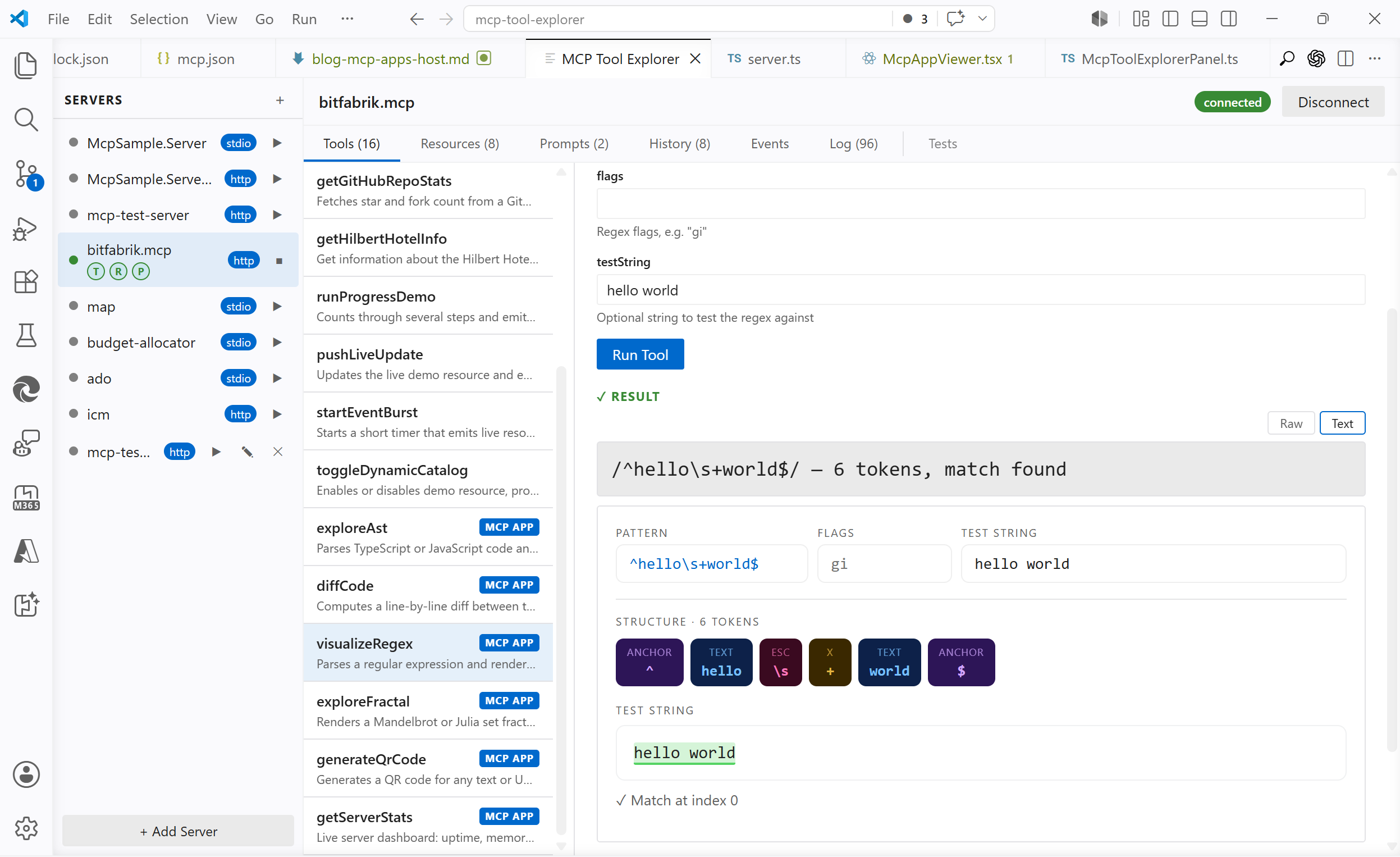 on
on https://bitfabrik.io/mcp
QR code generator: generates a QR code for any text or URL, live-updating as you type
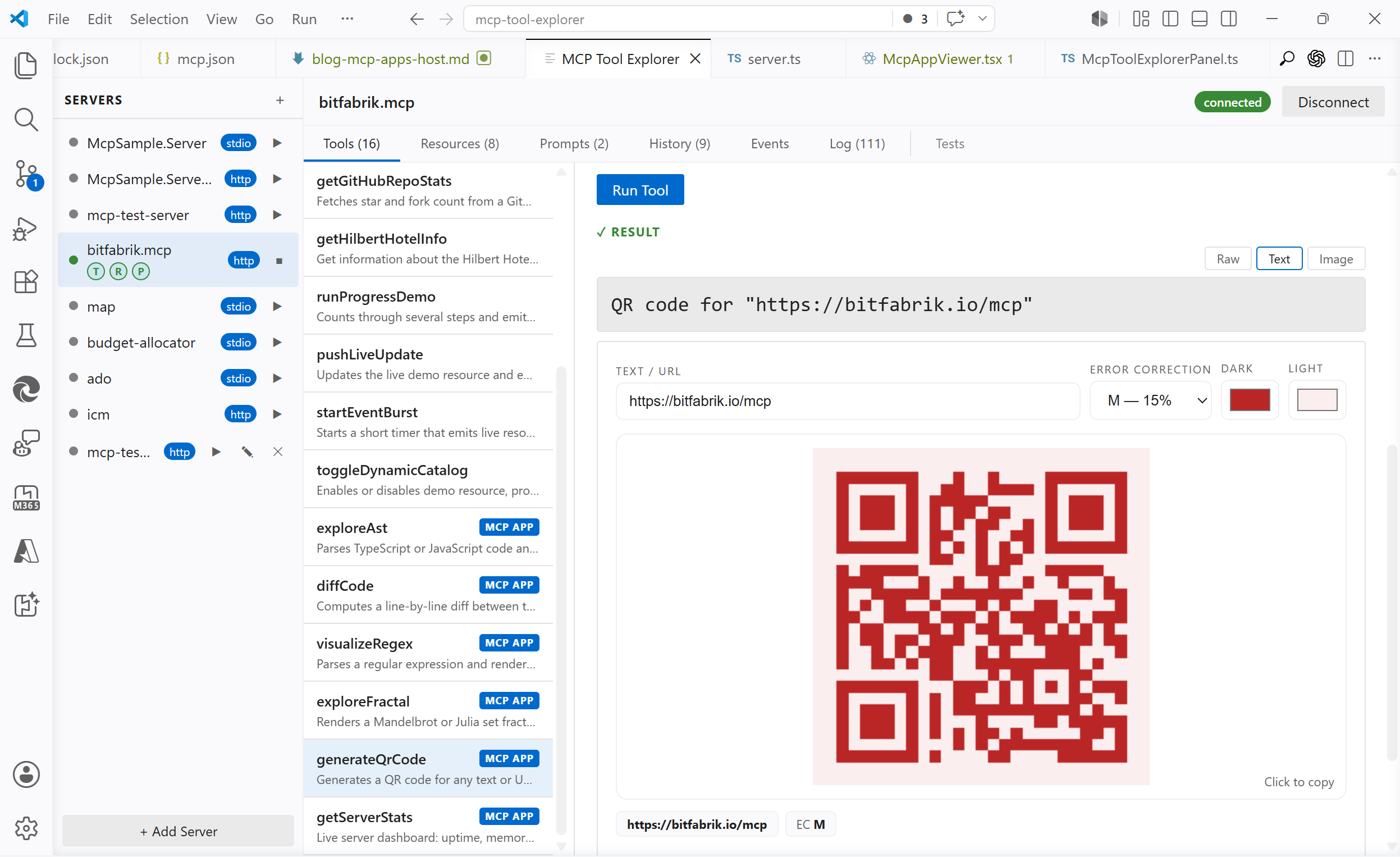 on
on https://bitfabrik.io/mcp
Code diff viewer: computes a line-by-line diff and renders a visual unified diff with syntax highlighting
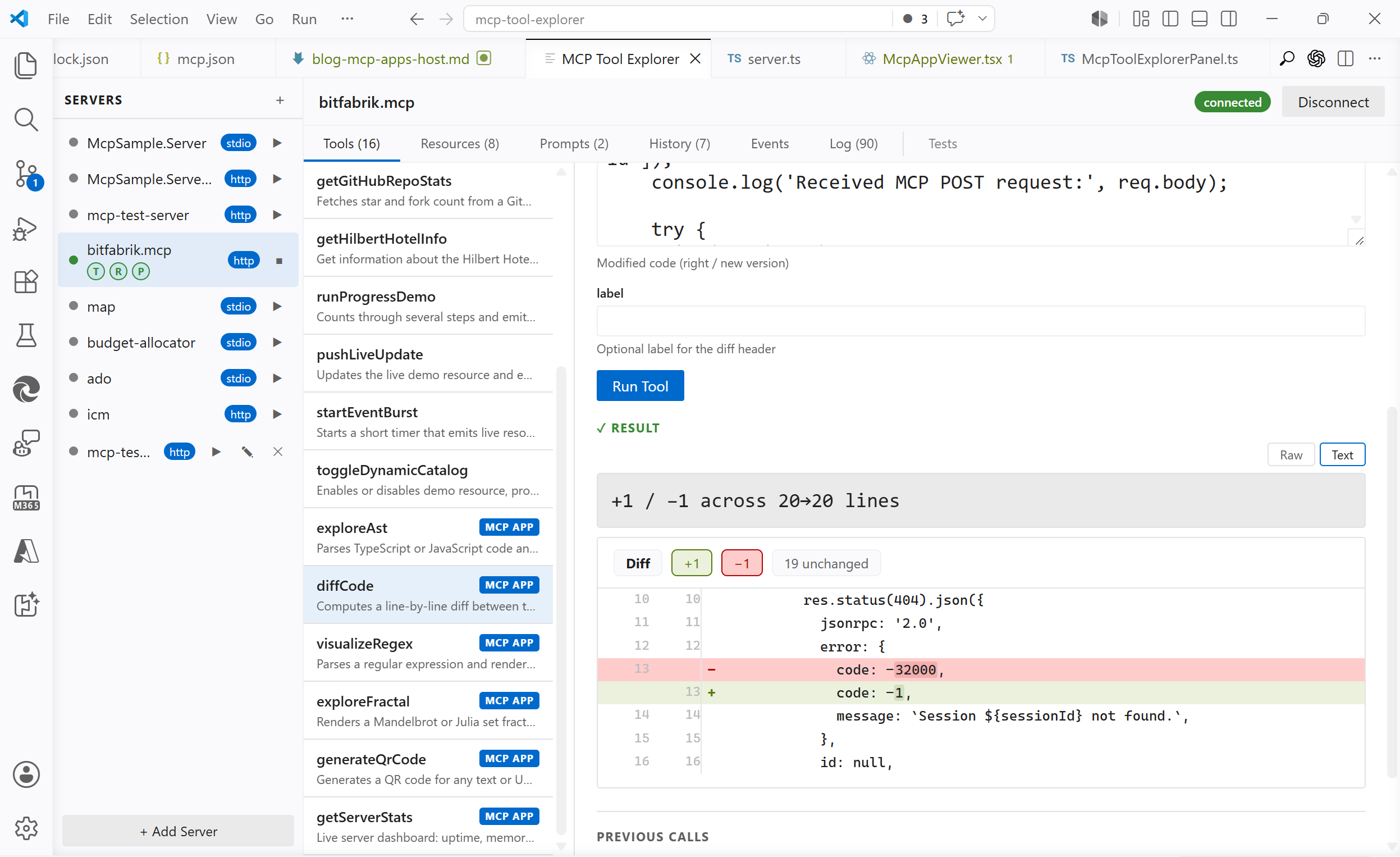 on
on https://bitfabrik.io/mcp
Fractal explorer: renders a Mandelbrot or Julia set; click to zoom
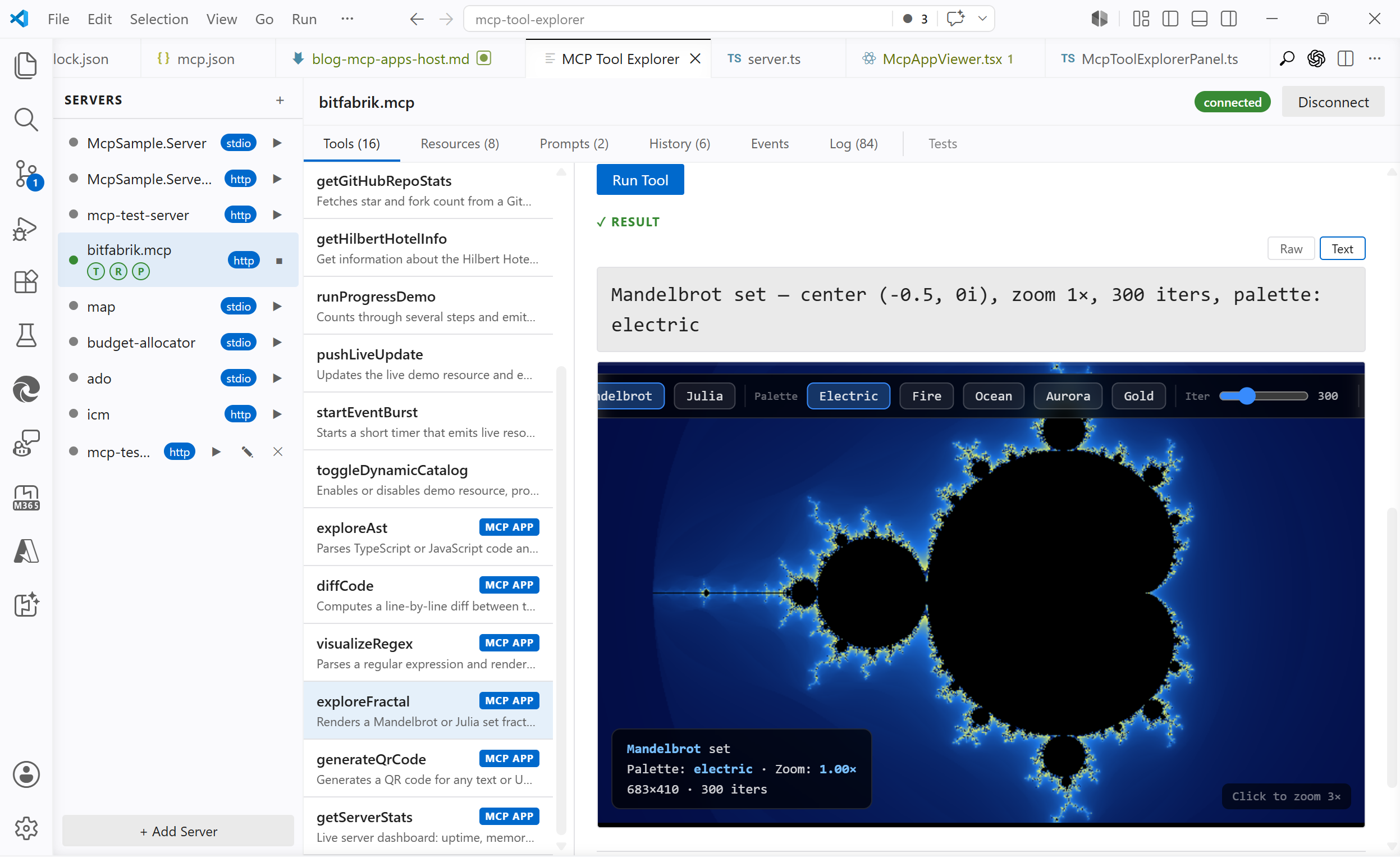 on
on https://bitfabrik.io/mcp
Server stats dashboard: live view of uptime, call counts, and recent requests
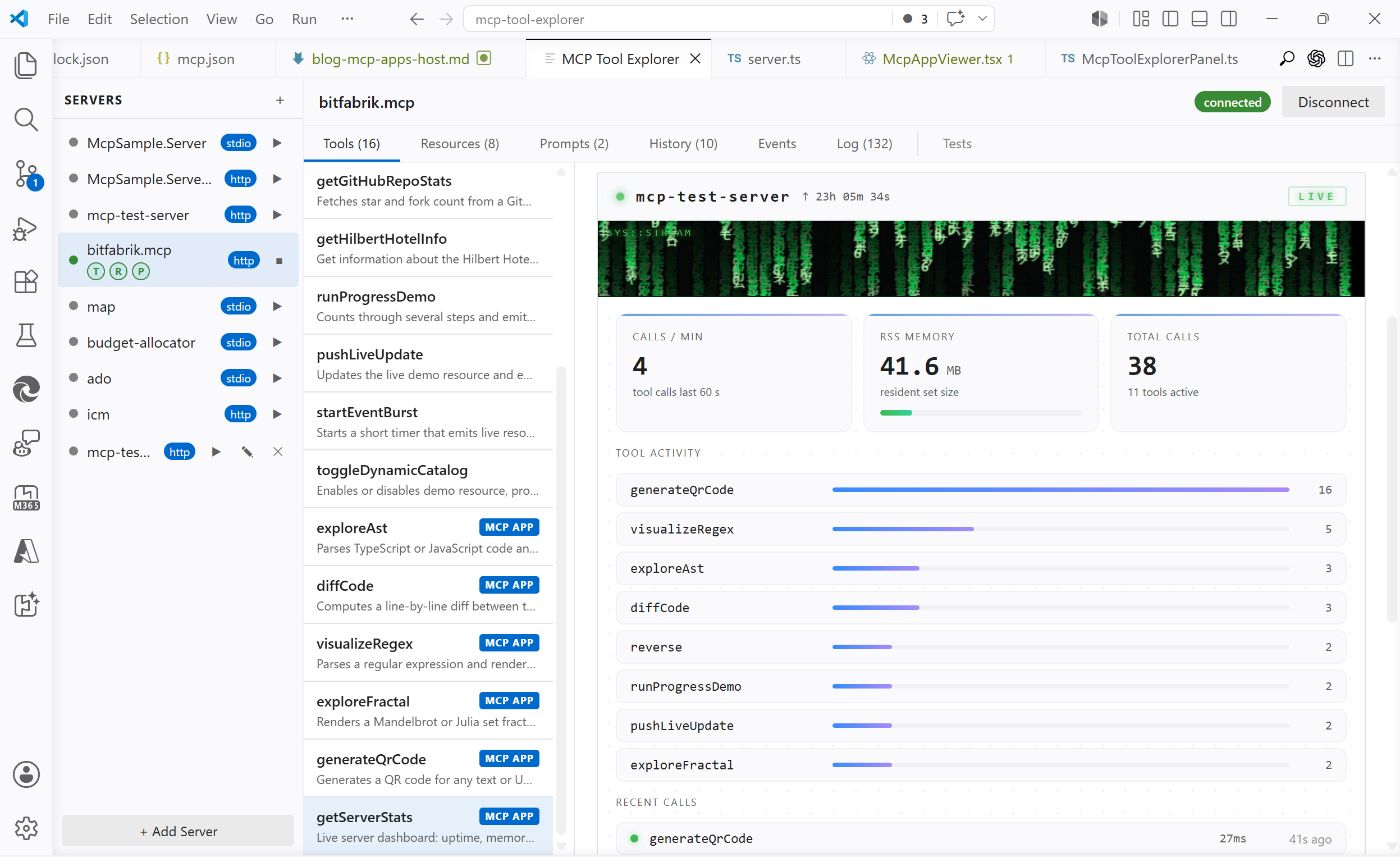 on
on https://bitfabrik.io/mcp
What MCP Apps Actually Is
MCP tools normally return text or JSON. MCP Apps extends MCP: a tool can include a ui:// resource URI in its _meta field. The host fetches that URI, gets back a full HTML document, renders it in a sandboxed iframe, and proxies JSON-RPC 2.0 messages between the iframe and the MCP server via postMessage.
That is the whole mechanism. The protocol is not exotic; it reuses the existing MCP resources/read call for the HTML fetch and standard JSON-RPC 2.0 for the iframe bridge. The spec explicitly notes that you do not need an SDK to implement it.
Supported hosts as of today: Claude, ChatGPT, VS Code, Goose, Postman, MCPJam.
The Architecture
The moving parts:
+------------------------------------------------------------+
|  VS Code                                                   |
|                                                            |
|  +------------------------------+                          |
|  |  Extension Host (Node.js)    |                          |
|  |  McpToolExplorerPanel.ts     |---------- HTTP ----------> MCP Server
|  |  McpClientManager.ts         |      (localhost:3000)    | (server.ts)
|  +------------------------------+                          |
|              |  postMessage                                |
|  +-----------v------------------+                          |
|  |  Webview (Chromium)          |                          |
|  |  McpAppViewer.tsx (React)    |                          |
|  |  +--------------------------+|                          |
|  |  | iframe (sandboxed)       ||                          |
|  |  | MCP App HTML             ||                          |
|  |  | (postMessage only,       ||                          |
|  |  |  no network access)      ||                          |
|  |  +--------------------------+|                          |
|  +------------------------------+                          |
+------------------------------------------------------------+
The iframe has sandbox="allow-scripts" and nothing else: no allow-same-origin, no network access, no cookies, no localStorage. McpAppViewer is the sole intermediary: it catches postMessage from the iframe and routes everything through the extension host to the real MCP server over HTTP.
One thing that is not obvious from the spec: the bridge lives in the webview, not inside the iframe. The app sends messages to window.parent; the host catches them from the outside. Nothing is injected into the iframe.
The Protocol
A tool advertises its UI in _meta:
{
  "name": "generateQrCode",
  "_meta": {
    "ui": {
      "resourceUri": "ui://mcp-test-server/qr-code"
    }
  }
}
The host signals support during initialize:
new Client(
  { name: 'my-host', version: '1.0.0' },
  {
    capabilities: {
      extensions: {
        'io.modelcontextprotocol/ui': { mimeTypes: ['text/html;profile=mcp-app'] },
      },
    },
  }
)
After a tool call, if the result's tool definition has _meta.ui.resourceUri, the host calls resources/read on that URI, gets HTML back in content[0].text, and hands it to the webview. The iframe then runs the full MCP handshake sequence over postMessage:
iframe → Host:  initialize
Host  → iframe: initialize result
iframe → Host:  notifications/initialized
iframe → Host:  ui/initialize                 (MCP Apps extension handshake)
Host  → iframe: ui/initialize result          (includes hostContext: theme, platform, displayMode)
iframe → Host:  ui/notifications/initialized  ← "I am ready"
Host  → iframe: ui/notifications/tool-input  { arguments: { ... } }
Host  → iframe: ui/notifications/tool-result { content: [...], structuredContent: { ... } }
After that, the iframe can call tools/call and resources/read interactively, and sends ui/notifications/size-changed to drive iframe resizing.
Implementing the Host
Advertising capability and fetching the HTML
The capability is declared in the Client constructor (shown above). On the server side, attaching _meta.ui to a tool registration requires a // @ts-ignore for now: the field is protocol-level but not yet in the SDK TypeScript types:
Without SDK:
// @ts-ignore — _meta is not yet typed in @modelcontextprotocol/sdk
server.registerTool('generateQrCode', {
  title: 'QR Code Generator',
  description: 'Generates a QR code for any text or URL',
  inputSchema: { text: z.string().describe('Text or URL to encode') },
  _meta: { ui: { resourceUri: 'ui://mcp-test-server/qr-code' } },
}, handler);
With SDK (@modelcontextprotocol/ext-apps/server), getUiCapability checks whether the connecting host supports UI before _meta is attached:
import { getUiCapability, RESOURCE_MIME_TYPE } from "@modelcontextprotocol/ext-apps/server";

const uiCap = getUiCapability(clientCapabilities);
if (uiCap?.mimeTypes?.includes(RESOURCE_MIME_TYPE)) {
  tool._meta = { ui: { resourceUri: 'ui://mcp-test-server/qr-code' } };
}
When a tool result arrives, the host reads the HTML and builds the CSP before handing it to the webview:
case 'fetchUiResource': {
  const result = await this._clientManager.readResource(message.serverId, message.uri);
  const content = result.contents?.[0];
  const html = content && 'text' in content && typeof content.text === 'string'
    ? content.text : undefined;
  if (!html) { /* send error */ break; }
  const uiMeta = (content as any)?._meta?.ui;
  this._post({ type: 'uiResourceContent', requestId: message.requestId, html, csp: uiMeta?.csp });
  break;
}
The _meta.ui.csp field is optional. If the server declares external domains there (CDN hosts for scripts, API endpoints), the host adds them to the iframe's CSP. Without it, default-src 'none' applies and all external fetches are blocked. That is by design.
function buildCsp(csp: CspMeta | undefined): string {
  const connect = csp?.connectDomains?.join(' ') ?? '';
  const resources = csp?.resourceDomains?.join(' ') ?? '';
  return [
    "default-src 'none'",
    `script-src 'self' 'unsafe-inline' ${resources}`.trimEnd(),
    `connect-src 'self' ${connect}`.trimEnd(),
    // …
  ].join('; ');
}
The CSP is injected as a tag prepended to the HTML before writing it to iframe.srcdoc. The iframe is shown immediately when the HTML arrives, not after the MCP handshake inside the iframe completes. Gating on that internal handshake would leave the host stuck on "Loading…" if the app is slow or broken.
The JSON-RPC bridge
The @modelcontextprotocol/ext-apps/app-bridge package wraps the whole handshake in a few lines:
import { AppBridge } from '@modelcontextprotocol/ext-apps/app-bridge';

const bridge = new AppBridge(iframeElement, mcpClient);
bridge.onReady(() => {
  bridge.sendToolInput({ arguments: toolArgs });
  bridge.sendToolResult(result);
});
For a VS Code webview with its own React architecture, a vanilla implementation was the more practical choice: the webview already has its own message bus between extension host and UI, and adding a second one creates more complexity than it removes. The whole bridge is around 150 lines. It handles initialize, ui/initialize, tools/call, resources/read, ui/open-link, ui/notifications/size-changed, and ping. Each message type is explicit, which is useful while the protocol is still maturing.
One detail that the sequence diagram makes clear: structuredContent must survive the entire round-trip. It is a first-class field added in MCP spec 2026-01-26; it sits alongside the plain content array and carries the machine-readable data that drives the app's UI. If any layer in the pipeline silently drops it, the iframe renders its empty state:
// host → webview → McpAppViewer props → ui/notifications/tool-result
if (m.type === 'toolResult') {
  sendToIframe({ jsonrpc: '2.0', id, result: {
    content: m.result, isError: m.isError,
    ...(m.structuredContent !== undefined ? { structuredContent: m.structuredContent } : {}),
  }});
}
Dynamic height
The iframe cannot read its own scrollHeight without allow-same-origin. Instead, the app sends ui/notifications/size-changed with its rendered height and the host resizes the iframe element accordingly:
<iframe
  ref={iframeRef}
  sandbox="allow-scripts"
  srcdoc={preparedHtml}
  style={{ height: iframeHeight }}
  title="MCP App"
/>
Startup Sequence
User clicks "Run"
       |
       v
ToolsPanel calls Extension
Extension calls MCP Server ──────────────────────────── HTTP POST
                            <────────── structuredContent ───────

McpAppViewer mounts, sends fetchUiResource
Extension calls resources/read("ui://…") ──────────── HTTP GET
                                          <──── HTML ────────────
iframe.srcdoc = html   ←── iframe starts

iframe                     McpAppViewer
  |── initialize ─────────────────────>|
  |<── result (ok) ────────────────────|
  |── ui/initialize ──────────────────>|
  |<── result (theme, platform, …) ────|
  |── ui/notifications/initialized ───>|
  |<── tool-input  { arguments }  ─────|   ← original args
  |<── tool-result { structuredContent}|   ← original result
  |
  renders initial state
Interactive tool calls afterward go through the same proxy path: iframe → postMessage → McpAppViewer → extension host → HTTP → MCP server → back.
Building an App: The QR Code Example
The QR code generator was built without a framework: plain JavaScript, JSON-RPC 2.0 over postMessage. It exposed two sandbox constraints immediately.
SVG data URIs are blocked. QRCode.toString(text, { type: 'svg' }) returns an SVG string. Putting it in an 
// ✗  blocked
img.src = 'data:image/svg+xml,' + encodeURIComponent(svg);

// ✓  works fine in sandboxed iframes
const pngDataUrl = await QRCode.toDataURL(text, { width: 300 });
img.src = pngDataUrl;
navigator.clipboard is silently unavailable. The null origin has no clipboard permission. The fallback that still works:
// ✗  silently fails
await navigator.clipboard.writeText(text);

// ✓  works even in sandboxed null origin
const ta = document.createElement('textarea');
ta.value = text;
document.body.appendChild(ta);
ta.select();
document.execCommand('copy');
document.body.removeChild(ta);
The app-side handshake is straightforward. The SDK's React binding handles it automatically; without it:
async function init() {
  await request('initialize', {
    protocolVersion: '2026-01-26',
    capabilities: {},
    clientInfo: { name: 'qr-code-app', version: '1.0.0' },
  });
  notify('notifications/initialized');

  const uiRes = await request('ui/initialize', {
    protocolVersion: '2026-01-26',
    clientInfo: { name: 'qr-code-app', version: '1.0.0' },
  });
  // uiRes.hostContext.theme → 'dark' | 'light'

  notify('ui/notifications/initialized');
  // host now sends tool-input and tool-result
}
Host Implementation Reference
| Capability | Advertise extensions['io.modelcontextprotocol/ui'] in initialize |
| HTML fetch | Standard resources/read on the ui:// URI |
| Sandbox | allow-scripts only, no allow-same-origin, no allow-top-navigation |
| CSP | Build from _meta.ui.csp; default-src 'none' as baseline |
| Bridge | Handle postMessage from the webview side; nothing injected into the iframe |
structuredContent |
MCP spec 2026-01-26; thread it through every layer of the pipeline |
| Timing | Show the iframe when HTML arrives, not when the SDK handshake completes |
| Resize | Handle ui/notifications/size-changed to drive iframe height |
| Theme | Pass hostContext.theme in ui/initialize result |
| CDN scripts | Only if server declares the domain in _meta.ui.csp.resourceDomains |
Observations
The protocol is simpler than it first appears. Once the architecture is clear (iframe sends to window.parent, webview catches from outside, extension host proxies over HTTP), the rest is just message routing. The non-obvious parts are the sandbox constraints (eval, SVG data URIs, clipboard all blocked without allow-same-origin) and the requirement to carry structuredContent through every layer. Both are easy to miss until something silently fails.
The SDK and the vanilla path produce the same result. The SDK is more concise on the app side; the vanilla implementation makes every protocol message explicit, which is useful when the spec is still evolving.
MCP Tool Explorer is available in the VS Code Marketplace. Point it at any MCP server that implements the spec; the UI appears automatically alongside the regular result view.