-
Mondfinsternis
Heute Nacht gab es oben am Himmel ein spannendes Alternativprogramm zum strahlenden Vollmond.
Traditionell wird der August-Vollmond auch als Störmond bezeichnet, und wenn sich die Erde genau zwischen Sonne und Mond schiebt und ihren Schatten wirft, sieht das Ganze gleich viel spannender aus. Wegen der partiellen Mondfinsternis hatte mir da mehr einen Sparmond mit dem charakteristischen hellen Rand. Weltweit passiert das zwar zwei- bis dreimal im Jahr, aber man muss ja trotzdem im richtigen Moment auch hinschauen.Ich habe mir kurzentschlossen die Nikon Z50II mit dem 50-250mm Objektiv geschnappt. Eigentlich gehört sich für Astrofotografie ja ein fettes Stativ. Dank gutem Bildstabilisator und ordentlich Luftanhalten ging das Ganze diesmal aber auch erstaunlich gut freihändig durch. Nach kurzer Zeit war der Moment dann auch schon wieder vorbei.
Der Erstkontakt:
1/25s f/6,31 ISO 6400/39° 50-250mm f/4,5-6,3 VR f=250mm/375mm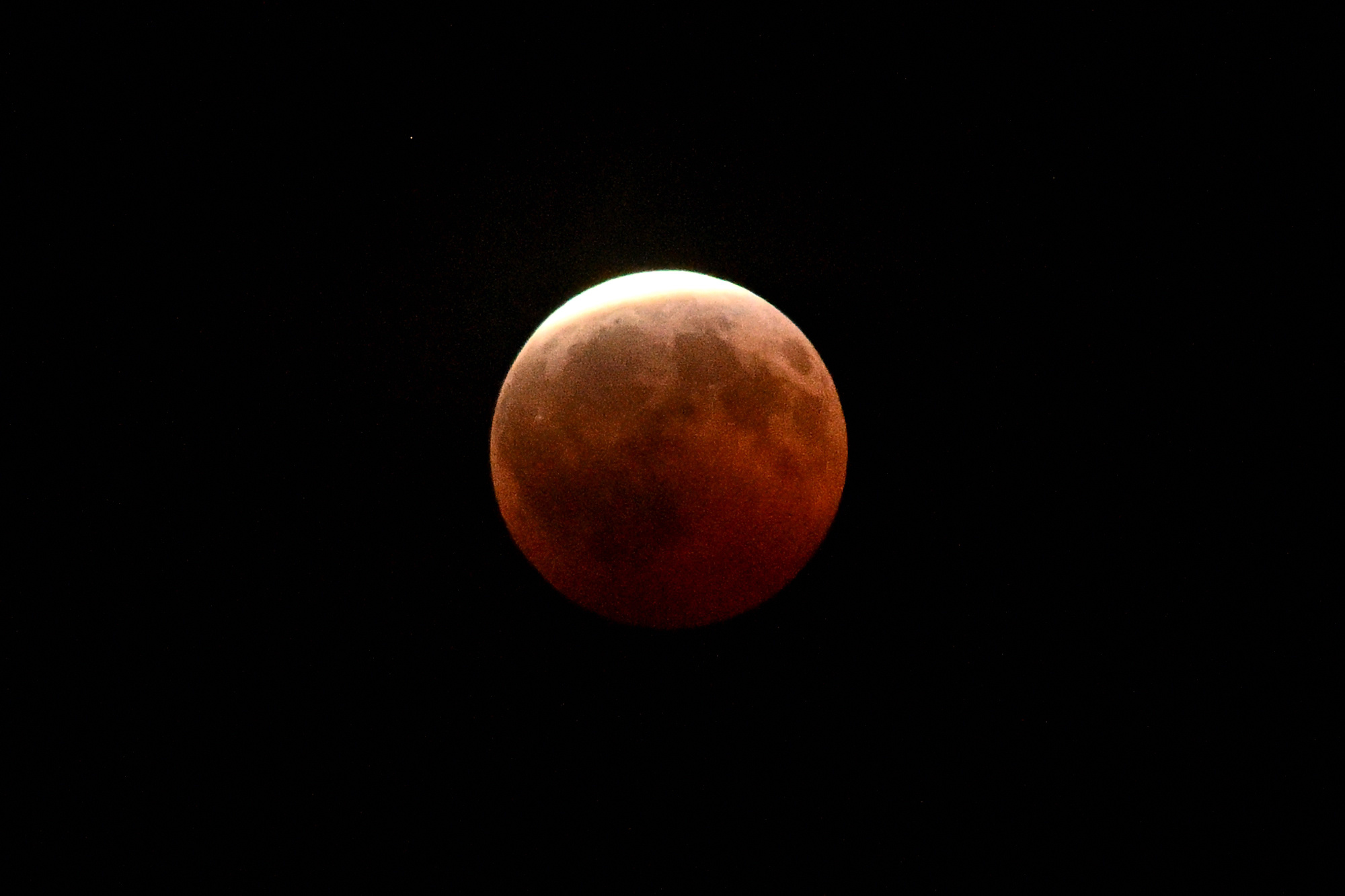
3 Minuten später:
1/25s f/6,3 ISO 2500/35° 50-250mm f/4,5-6,3 VR f=250mm/375mm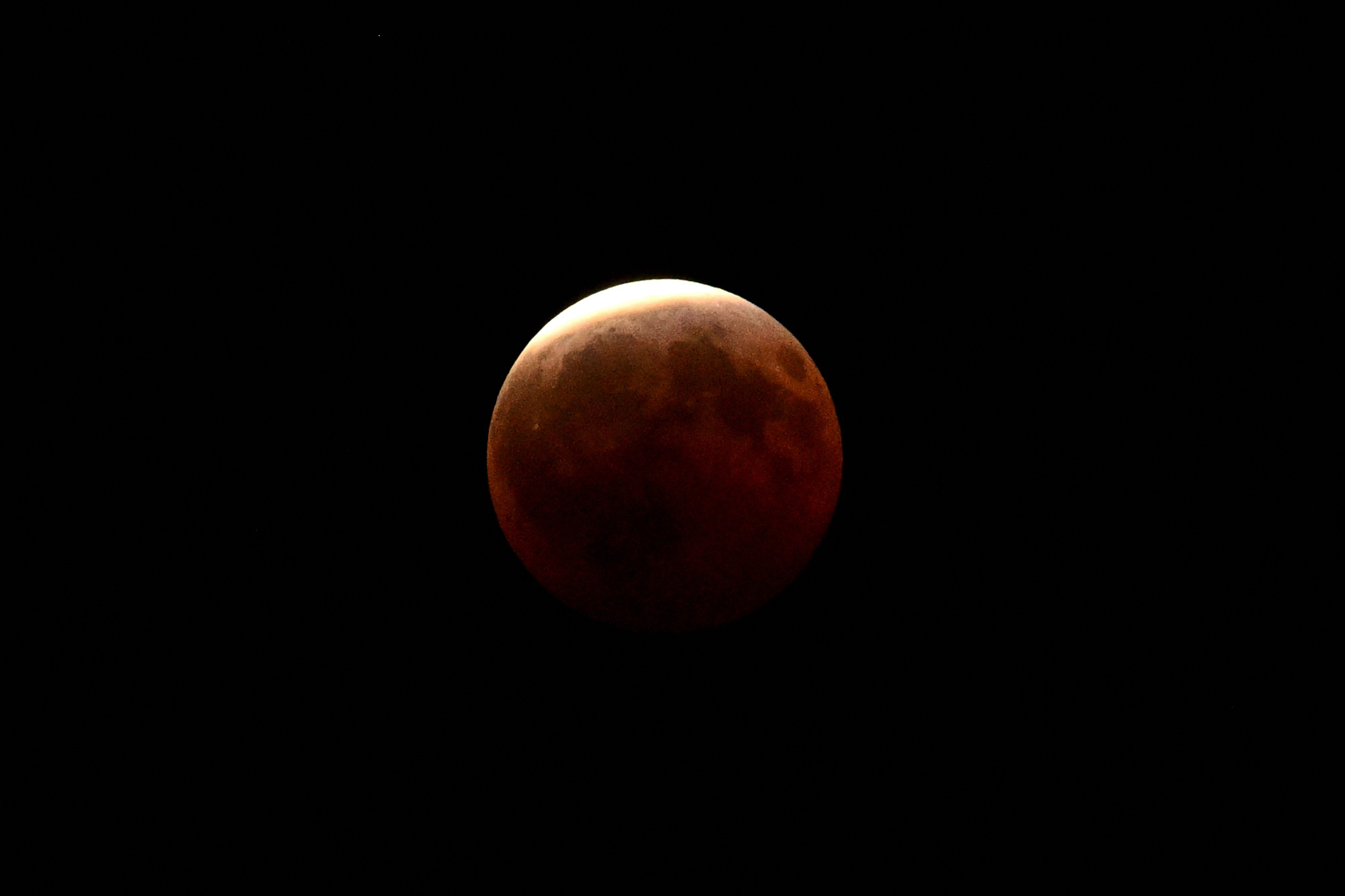
nochmal 3 Minuten später, immer noch da:
1/15s f/6,3 ISO 1250/32° 50-250mm f/4,5-6,3 VR f=250mm/375mm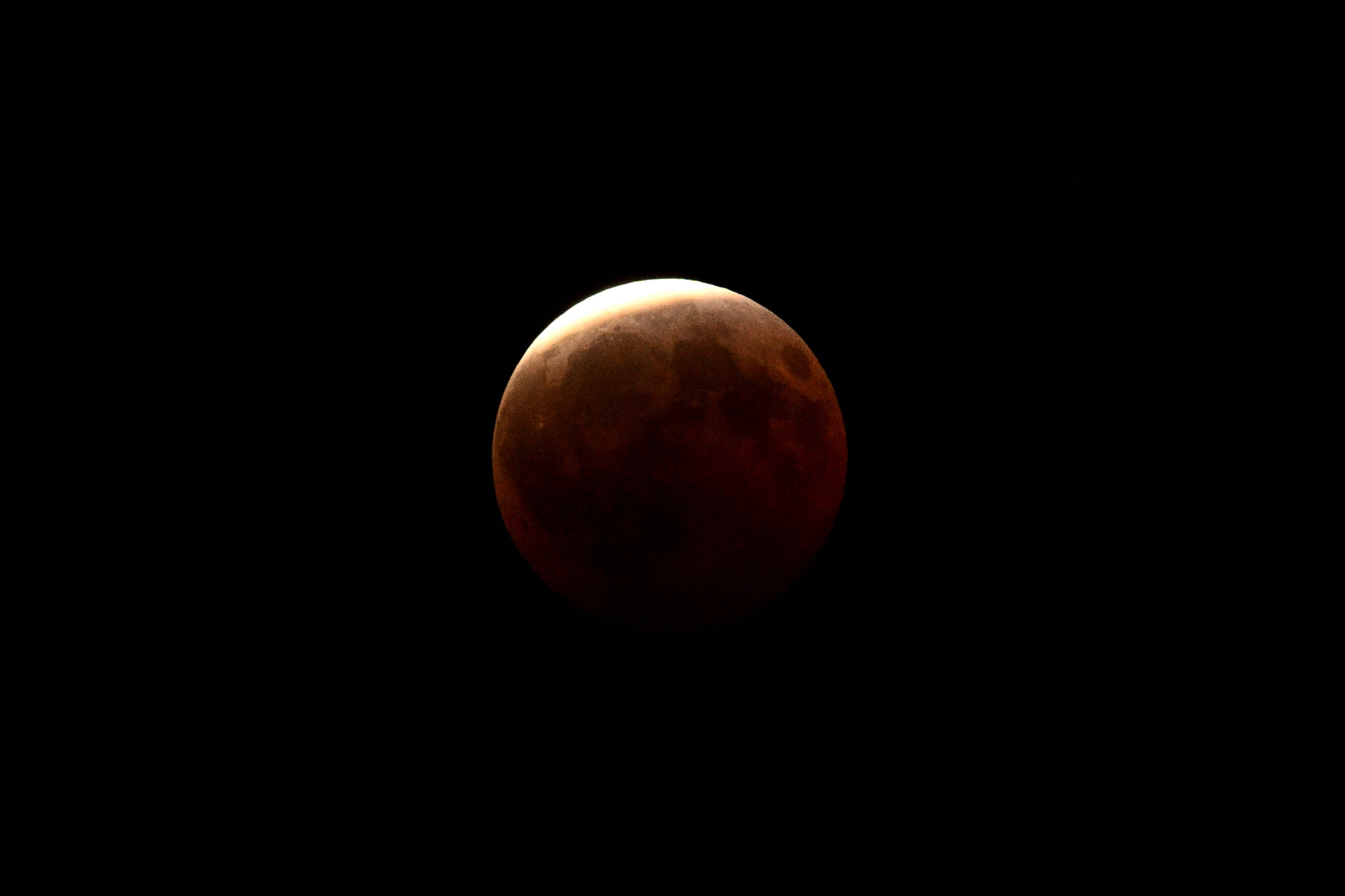
Viel länger hätte ich die Luft eh nicht anhalten können. Kurz darauf haben die Nachbarbäume die Sichtachse zensiert, weil sie wohl unbedingt auch mit aufs Bild wollten.
Aber die Finsternis ist nicht nur für Sternengucker spannend, sie verändert die ganze Natur:
🪲
Mistkäfer nutzen als weltweit einzige bekannte Lebewesen das schwache Lichtband der Milchstraße, um dank hochempfindlicher Facettenaugen nachts perfekt geradeaus zu navigieren. Weil das störende, helle Mondlicht plötzlich weggedimmt wird, sehen sie die Galaxie viel besser, legen den intergalaktischen Vorwärtsgang ein und rollen ihre Dungkugeln2 plötzlich dreimal schneller und präziser als in jeder normalen Vollmondnacht.🌋
Das rote Leuchten des Blutmonds ist die Summe aller Sonnenuntergänge der Erde. Die Atmosphäre wirkt wie ein gigantisches Prisma und projiziert das weltweite Abendrot direkt auf den Mond. Gleichzeitig sackt die Temperatur dort oben so schlagartig ab, dass der Mond schrumpft und messbare Mondbeben ausgelöst werden.⛵
Im Jahr 1504 rettete eine Mondfinsternis Christoph Kolumbus das Leben. Als die Ureinwohner auf Jamaika ihm keine Vorräte mehr geben wollten, drohte er ihnen an, Gott würde dem Mond das Licht stehlen. Als die Finsternis wie vorhergesagt eintraf, gaben die verängstigten Inselbewohner ihm sofort alles, was er brauchte.
-
Hab doch tatsächlich versucht, die Blende auf 2,8 hochzudrehen. Vollmond halt. ↩
-
Das Logistik-Unternehmen Dungtransport ist pure Lebensversicherung: Frischer Dung liefert wichtige Nährstoffe, sorgt am Haufen aber für ordentlich Gedränge. Um den Proviant nicht an die Konkurrenz zu verlieren, formen sie blitzschnell eine Kugel, flüchten auf dem absolut schnellsten Weg (daher die gerade Linie via Milchstraße) und vergraben das leckere Mittagessen als ungestörtes Festmahl oder exklusive Kinderstube für den Nachwuchs.
Mehr Details zu diesem Orientierungsverfahren gibt es im Wikipedia-Eintrag zum Mistkäfer und in der wissenschaftlichen Originalstudie von Marie Dacke auf ScienceDirect. ↩
-
-
Surfen auf der Raumwelle: Wellendynamik, Tageszeiten und Antennenformen der Kurzwelle
Das unsichtbare Uhrwerk der Kurzwelle: Wellendynamik, Tageszeiten und Antennenformen
Wer sich nach den ersten Gehversuchen im Antennenbau tiefer in die Welt der Kurzwelle (3 bis 30 MHz) begibt, stellt schnell fest: Die Kurzwelle schläft nie, aber sie verändert stündlich ihr Gesicht. Während ein UKW-Signal stur und verlässlich bis zum Horizont wandert, gleicht die Kurzwelle einem dynamischen Organismus. Bänder, die mittags vor Signalen fast überlaufen, sind nachts plötzlich wie leergefegt, nur um Platz für weltweite Verbindungen auf Frequenzen zu machen, die tagsüber völlig unbrauchbar schienen.
Um dieses Zusammenspiel aus solarer Strahlung, Frequenz und Zeit ohne langes Suchen zu durchschauen, lässt sich die Dynamik der Ionosphäre in einer zentralen Matrix zusammenfassen.
Die Ausbreitungs-Matrix: Frequenz vs. Tageszeit
Frequenzbereich Tagsüber (Starke Sonne ☀️) Nachts (Keine Sonne 🌙) Physikalisches Phänomen in der Praxis Obere Kurzwelle
(14 - 30 MHz)
• 20m, 15m, 10mPerfekt für DX (Weitverkehr):
Die Wellen durchbrechen die D-Schicht mühelos und werden von der geladenen F-Schicht flach reflektiert.Völlig tot (Offen ins All):
Ohne Sonne verliert die F-Schicht ihre Ladung. Die schnellen Wellen fliegen ungebremst ins Weltall.Reine Tagbänder. Perfekt für interkontinentale Verbindungen, solange die Sonne scheint. Macht nach Sonnenuntergang rasant dicht. Mittlere Kurzwelle
(7 MHz)
• 40mDas NVIS-Arbeitspferd:
Hoch genug, um die D-Schicht zu durchdringen, aber niedrig genug für Steilstrahlung (NVIS) an der F-Schicht.Das DX-Arbeitspferd:
Für Steilstrahlung zu hoch (Signal entweicht), aber bei flachen Winkeln spiegelt die Restladung für weltweiten Funk.Das Chamäleon. Tagsüber die erste Wahl für den regionalen Nahverkehr (0-500 km), nachts öffnet es sich für den weltweiten Funkverkehr. Untere Kurzwelle
(1,8 - 3,5 MHz)
• 160m, 80mKomplett blockiert (Dämpfung):
Die Wellen regen freie Elektronen in der dichten D-Schicht an. Die Energie verpufft komplett als Wärme.Perfekt für NVIS & DX:
Die D-Schicht löst sich nachts auf. Die schwache Nacht-F-Schicht reicht für diese Wellen zur Totalreflexion.Reine Nachtbänder. Tagsüber herrscht hier bis auf die ultrakurze Bodenwelle absolute Stille. Nachts das primäre Band für den Nahbereich.
Faszinierende Anomalien: Wenn die Physik die Regeln beugt
Hinter dieser Matrix steckt die Wechselwirkung aus der solaren UV- und Röntgenstrahlung und den Gasmolekülen unserer Atmosphäre. Doch die Natur hält sich nicht immer an starre Zeitpläne. Drei Phänomene zeigen, wie faszinierend die Dynamik der Raumwelle ist:
1. Das Phänomen der Graulinie (Greyline Propagation)
Zweimal am Tag passiert auf der Erde etwas Magisches: Die Dämmerungszone (der Terminator) wandert als schmaler Streifen um den Globus. In diesem Bereich ist die Sonne am Boden bereits untergegangen (oder geht gerade auf), wodurch sich die blockierende D-Schicht blitzschnell auflöst. Gleichzeitig steht die hunderte Kilometer höhere F2-Schicht noch vollem Sonnenlicht und ist maximal ionisiert.
Für den Funker bedeutet das: Signale auf den niedrigeren Bändern (wie 40m oder 80m) können sich entlang dieser "grauen Linie" mit extrem geringer Dämpfung um die halbe Erde tasten. Es entstehen für wenige Minuten hocheffiziente Funkwege zwischen Regionen, die eigentlich auf der Nachtseite liegen, und solchen, die gerade erwachen.
Exkurs: Warum absorbiert nur die D-Schicht die niedrigen Frequenzen?
Ein Paradoxon des Funks: Die D-Schicht weist die geringste Elektronendichte (Ionisierung) aller Schichten auf, aber warum verursacht ausgerechnet sie am Tag eine so starke Dämpfung der längeren Wellen (wie auf dem 80m- oder 160m-Band), während die viel stärker ionisierten E- und F-Schichten das Signal passieren lassen?
Der Grund liegt in der Dichte der umgebenden Atmosphäre:
- In der D-Schicht (ca. 60-90 km Höhe): Hier ist die Erdatmosphäre noch vergleichsweise dicht. Es befindet sich dort eine hohe Anzahl neutraler Gasmoleküle. Wenn eine niedrige Funkfrequenz eintrifft, bringt sie die freien Elektronen zum Schwingen. Aufgrund der geringen Abstände kollidieren diese schwingenden Elektronen ständig mit den trägen Gasmolekülen. Bei jedem Zusammenstoß wird die Bewegungsenergie der Elektronen in Wärme umgewandelt und die Funkwelle wird dadurch stark gedämpft (Absorption).
- In den höheren E- und F-Schichten (ab 100 km Höhe): In diesen Höhen herrscht ein extremes Vakuum, die Luft ist extrem dünn. Wenn die Funkwelle die Elektronen dort zum Schwingen bringt, bewegen sich diese nahezu ungehindert. Mangels Masse kommt es kaum zu Kollisionen mit Gasmolekülen, wodurch auch keine Energie in Wärme umgewandelt wird. Die Elektronen können die Welle sauber brechen und zur Erde zurückreflektieren (Refraktion).
Zusammenfassend: Niedrige Frequenzen regen die Elektronen zu größeren Schwingungsamplituden an. In der relativ dichten Atmosphäre der D-Schicht führt dies zu einer hohen Kollisionsrate und somit zu hohen Energieverlusten. In den dünneren, höheren Schichten bleibt diese Dämpfung aus, wodurch das Signal ungestört reflektiert werden kann.
2. Die Winteranomalie (Winter Anomaly)
Man sollte intuitiv erwarten, dass die Ionosphäre im Sommer am stärksten ionisiert ist, da die Sonne dann am höchsten steht. Auf den oberen Bändern (wie 20m oder 10m) beobachtet man jedoch das Gegenteil: Die höchsten Grenzfrequenzen tagsüber werden oft im Spätherbst und Winter erreicht.
Der Grund liegt in der Thermodynamik der Atmosphäre und einem Phänomen, das es hier unten bei uns auf der Erde gar nicht gibt: Dem Verhältnis von Molekülen zu freien Atomen:
- Das physikalische Geheimnis: Hier unten am Boden existieren Gase wie Sauerstoff ($O_2$) oder Stickstoff ($N_2$) fast nur als "Paare" (Moleküle). In über 100 km Höhe bricht die starke UV-Strahlung der Sonne diese Paare jedoch auseinander. Es entstehen "Singles", sogenannte freie, ungebundene Atome (einzelner Sauerstoff $O$), die völlig losgelöst durchs All fliegen.
- Im Sommer: Die Sonne heizt die obere Atmosphäre stark auf, wodurch sie sich ausdehnt. Durch diese globale Zirkulation werden die schweren, trägen Gas-Paare (Moleküle) aus tieferen Schichten nach oben in die F-Schicht transportiert. Das Verhältnis von Singles zu Paaren sinkt. Da diese Moleküle freie Elektronen wie ein Schwamm aufsaugen und rekombinieren, sinkt die Elektronendichte, unser Funksignal verliert seinen Spiegel.
- Im Winter: Die obere Atmosphäre kühlt ab und zieht sich zusammen. In der F-Schicht dominieren nun die leichten Singles (freie Sauerstoff-Atome $O$). Da diese einzelnen Atome die Elektronen in Ruhe lassen, bleibt die freie Elektronendichte trotz weniger Sonnenstunden extrem hoch.
Das Ergebnis ist eine hocheffiziente Reflektion hoher Frequenzen mitten im tiefsten Winter.
3. Sporadic-E ($E_s$): Der Sommer-Joker
Gelegentlich bildet sich im Sommer (Mai bis August) in einer Höhe von ca. 90 bis 120 km, also mitten in der eigentlich unbedeutenden E-Schicht, eine wolkenartige, extrem dichte Ionisation aus. Dieses Phänomen nennt sich Sporadic-E.
Die Ursache liegt meist in einer Kombination aus Höhenwinden (Scherwinden) und Meteorenstaub. Diese Wolken sind so dicht, dass sie selbst Frequenzen reflektieren, die sonst nie von der Ionosphäre zurückgeworfen werden: das 10m-Band mutiert zum lokalen Kraftpaket, und selbst VHF-Signale im 6m- oder 2m-Band (inklusive des UKW-Rundfunks) spiegeln sich plötzlich über tausende Kilometer. Das Phänomen taucht unvorhersehbar auf und verschwindet oft nach wenigen Stunden wieder.
4. Die solare Aktivität: Sonnenfleckenzyklus und Ausbreitungsbedingungen
Die Eigenschaften der Ionosphäre hängen maßgeblich vom ca. 11-jährigen Sonnenfleckenzyklus ab. Die Anzahl der Sonnenflecken (Sonnenflecken-Relativzahl) ist ein direkter Indikator für die Intensität der solaren UV- und Röntgenstrahlung, welche die Ionisation der Erdatmosphäre steuert. Veränderungen in dieser Aktivität wirken sich stark auf die Nutzbarkeit der Frequenzbänder aus, führen in der Praxis jedoch auch zu scheinbaren Widersprüchen.
- Die oberen Bänder (15m, 12m und das 10m-Band im Extremfall): Bei einer hohen Anzahl von Sonnenflecken steigt die Elektronendichte in der F-Schicht deutlich an. Dadurch verschiebt sich die maximale nutzbare Frequenz (MUF: Maximum Usable Frequency) nach oben. Das 10-Meter-Band reagiert hierbei am empfindlichsten: Im solaren Maximum mutiert es zum hocheffizienten DX-Band, auf dem weltweite Kontakte mit minimaler Leistung gelingen. In Phasen geringer solaren Aktivität (Sonnenfleckenminimum) kehrt sich dieser Effekt jedoch um. Da die Ionisation der oberen Schichten dann nicht ausreicht, um diese Frequenzen zu reflektieren, sind die Bänder im Bereich von 21 MHz und höher (15, 12 und 10 Meter) die unzuverlässigsten Frequenzbereiche für Weitverbindungen. Das 10m-Band bleibt abseits von Sporadic-E im Sommer oft jahrelang für den DX-Verkehr geschlossen.
- Die unteren Bänder als Profiteure des Minimums (80m- und 160m-Band): Während die oberen Bänder im solaren Minimum an Leistungsfähigkeit verlieren, schlägt die Stunde der unteren Kurzwelle. Im Sonnenfleckenmaximum sorgt die hohe solare Strahlung dafür, dass die tiefe D-Schicht tagsüber extrem stark ionisiert ist und niedrige Frequenzen komplett dämpft. Selbst nachts bleibt oft eine spürbare Restdämpfung und Unruhe im Erdmagnetfeld bestehen. Im Sonnenfleckenminimum hingegen baut sich die blockierende D-Schicht nach Sonnenuntergang extrem schnell und vollständig ab. Gepaart mit einem ruhigen Magnetfeld bietet das solare Minimum daher die historisch besten DX-Bedingungen für das 80-Meter- und insbesondere das 160-Meter-Band, da Signale nachts mit minimalen Verlusten an der F-Schicht reflektiert werden.
- Erhöhte Dämpfung und Radio Blackouts: Unabhängig von den Basisbedingungen bringt eine hohe solare Aktivität spontane Einschränkungen mit sich. Solare Eruptionen (Solar Flares) führen zu einer schlagartigen, extremen Ionisation der dichten D-Schicht. Da diese Schicht aufgrund der höheren Teilchendichte stark absorbierend wirkt (wie im Exkurs oben beschrieben), werden niedrigere Frequenzen komplett gedämpft. Bei starken Ausbrüchen kommt es zum sogenannten Mögel-Dellinger-Effekt (Shortwave Fadeout), bei dem der Funkverkehr auf der Tagseite der Erde zeitweise vollständig zusammenbricht.
Die Kontroverse: Hoher Solar Flux (SFI) ohne verbesserte Bedingungen In der Funkpraxis führt die Interpretation der solaren Messwerte regelmäßig zu Diskussionen. Ein hoher Solar Flux Index (SFI) gilt allgemein als Indikator für hervorragende DX-Bedingungen. Dennoch kommt es vor, dass die Bänder trotz Rekordwerten der Sonne geschlossen bleiben oder die Signale stark gedämpft sind.
Dieser Widerspruch entsteht meist durch das Zusammenspiel mit geomagnetischen Stürmen, die oft auf solare Eruptionen folgen. Diese Stürme stören das Erdmagnetfeld und führen zu einer Depression der F2-Schicht und die Elektronendichte sinkt lokal ab, anstatt zu steigen. Zudem kann die physikalische Aufheizung der oberen Atmosphäre im Sommer (analog zur Winteranomalie) die Rekombination der Elektronen beschleunigen. Ein hoher Fleckenindex ist daher keine isolierte Garantie für offene Bänder, sondern muss immer im Kontext der geomagnetischen Aktivität (K-Index) und der saisonalen Thermodynamik betrachtet werden.
Das Antennen-Szenario: Die Werkzeuge für die Kurzwelle
Während die Endfed-Antenne ein guter Allrounder ist, erfordern spezifische Anwendungen angepasste Geometrien und Antennenformen, die andere Anpassungsnetzwerke als unser 9:1 Unun benötigen.
- Kurz erklärt: Was ist ein Unun? Der Begriff steht für Unbalanced-to-Unbalanced (unsymmetrisch auf unsymmetrisch). Es ist ein Hochfrequenz-Transformator, der die Impedanz (den Widerstand) zwischen einer unsymmetrischen Antenne (wie einer Endfed, die ein Gegengewicht oder die Erde nutzt) und dem unsymmetrischen Koaxialkabel anpasst. Er wandelt nur den Widerstand um, ändert aber nichts an der Symmetrie.
- Der Unterschied zum Balun: Ein Balun hingegen verbindet eine Balanced (symmetrische Antenne wie einen Dipol mit zwei gleichen Schenkeln) mit dem Unbalanced (unsymmetrischen) Koaxialkabel.
Hier sehen wir, wie sich andere klassische Antennenformen im Vergleich zu unserem Endfed-Setup schlagen:
1. Der klassische Halbwellen-Dipol ($\lambda/2$)
Der im Zentrum gespeiste Dipol benötigt keinen 9:1 Unun, da seine Fußpunktimpedanz bereits bei ca. 50-73 $\Omega$ liegt. Er ist ein exzellentes Werkzeug für Richtfunk (DX) bei ausreichender Höhe (mindestens $\lambda/2$). Für den Nahbereich (NVIS) gilt die Faustformel: Die Antenne erzielt die besten Ergebnisse, wenn sie in einer Höhe zwischen $0{,}1\,\lambda$ und $0{,}2\,\lambda$ über dem Boden installiert wird (beim 40m-Band entspricht das genau einer Höhe von ca. 4 bis 8 Metern). Wird sie noch tiefer abgesenkt, steigen die Erdverluste durch die kapazitive Kopplung massiv an und absorbieren einen Großteil der Sendeleistung.
2. Die Magnetische Loop-Antenne (MagLoop)
Diese platzsparende, rauscharme Antenne nutzt einen Drehkondensator zur Abstimmung, was sie ideal für den Balkon macht. Aufgrund ihrer hohen Schmalbandigkeit muss sie bei Frequenzwechseln nachgestimmt werden. Die Einkopplung erfolgt hier meist direkt, ohne den 9:1 Unun.
3. Die Vertikal-Antenne (Groundplane)
Mit einer Länge von $\lambda/4$ und Radials strahlt die Vertikalantenne flach ab und ist ideal für DX auf oberen Bändern. Sie weist eine niedrige Impedanz (30-50 $\Omega$) auf und wird direkt über ein 50 $\Omega$ Koaxialkabel gespeist, nicht über den 9:1 Unun.
4. Die Delta Loop
Diese einwellenlange ($\lambda$) Dreieckantenne vereint geringes Rauschen mit flachem Abstrahlwinkel. Mit einer Impedanz von 100-150 $\Omega$ ist sie für den 9:1 Unun ungeeignet; stattdessen werden 2:1 oder 4:1 Baluns eingesetzt. Sie bietet zudem flexible Polarisationsmöglichkeiten für NVIS oder DX.
Fazit
Wer die Kurzwelle beherrschen will, baut nicht einfach nur eine Antenne, er lernt, das unsichtbare Uhrwerk der Erde zu lesen. Wer weiß, zu welcher Stunde die D-Schicht schläft, wann die F-Schicht das Tor zum Weltall öffnet und welche Antennenform den passenden Winkel in den Himmel meißelt, für den wird die Kurzwelle zu einem faszinierenden, weltumspannenden Spielplatz der Physik.
-
SSB-Modulation & Digitale Signalverarbeitung
Von den analogen Anfängen bis zur modernen SDR-Mathematik
1. Was ist SSB-Modulation?
SSB (Single-Sideband Modulation / Einseitenbandmodulation) ist ein hocheffizientes Verfahren zur analogen Übertragung von Sprache und Daten über Funkwellen. Es ist eine Spezialform der Amplitudenmodulation (AM).
Das Problem bei klassischer AM
Bei der normalen Amplitudenmodulation entstehen durch die Mischung des Trägers mit dem Audiosignal drei Komponenten:
- Der Träger: Verbraucht bis zu $50\,\%$ der Sendeleistung, enthält aber selbst keine Information.
- Das obere Seitenband (USB - Upper Sideband): Enthält die vollständige Information.
- Das untere Seitenband (LSB - Lower Sideband): Enthält exakt dieselbe Information spiegelbildlich.
Die SSB-Lösung
SSB filtert den Träger und eines der beiden Seitenbänder komplett heraus. Die gesamte Sendeleistung fließt zu $100\,\%$ in ein einziges Seitenband.
$f_{\text{SSB}} = f_{\text{Träger}} \pm f_{\text{Audio}}$
- Vorteile: Halbe Bandbreite (ca. $2{,}4\text{ kHz}$ statt $6\text{ kHz}$), enorme Sende-Effizienz und drastisch höhere Reichweite.
- Nachteile: Komplexe Technik bei der Rückgewinnung und ungeeignet für Musik (leichte Frequenzverschiebungen verzerren den Klang).
2. Das historische LSB-Rätsel (< 10 MHz)
In offiziellen Bandplänen gilt die Konvention: Unterhalb von $10\text{ MHz}$ wird LSB genutzt, oberhalb USB. Dies hat keine physikalischen, sondern rein historische Gründe aus den 1950er Jahren.
Das technische "9-MHz-Problem"
Frühe SSB-Funkgeräte nutzten eine feste Zwischenfrequenz (ZF) von genau $9\text{ MHz}$ und mischten diese mit einem variablen Oszillator (VFO), der von $5{,}0\text{ MHz}$ bis $5{,}5\text{ MHz}$ regelbar war. Durch die mathematische Summen- und Differenzbildung beim Mischen passierte Folgendes:
-
Höhere Bänder (z. B. 20m-Band / 14 MHz): Es wurde die Addition genutzt: $9{,}0\,\text{MHz}_{\text{ZF}} + 5{,}0\,\text{MHz}_{\text{VFO}} = 14{,}0\,\text{MHz}$
Bei der Addition bleibt die Lage des Seitenbandes gleich. Aus USB auf der Zwischenfrequenz wurde USB auf dem Band.
-
Tiefe Bänder (z. B. 80m-Band / 3,5 MHz): Es wurde die Subtraktion genutzt: $9{,}0\,\text{MHz}_{\text{ZF}} - 5{,}5\,\text{MHz}_{\text{VFO}} = 3{,}5\,\text{MHz}$
Das Besondere: Bei einer mathematischen Subtraktion wird das Frequenzspektrum invertiert (gespiegelt). Das ursprünglich als USB erzeugte Signal drehte sich automatisch in ein LSB-Signal um.
Da frühe Hersteller aus Kostengründen auf teure Umschaltfilter verzichteten, bürgerte sich diese Eigenschaft weltweit als Standard ein.
3. Zwischenfrequenz & Mechanische Filter
Die Erfindung des Superheterodyne-Empfängers (Superhet) löste das Problem, dass man extrem schmale Filter ($2{,}4\text{ kHz}$ für Sprache) nicht kontinuierlich über alle Funkbänder abstimmbar bauen konnte. Man mischt jedes Antennensignal auf eine feste Zwischenfrequenz (ZF) herunter.
Der Sweet-Spot: 9 MHz
$9\text{ MHz}$ bot den perfekten Kompromiss: Hoch genug, um unerwünschte Spiegelfrequenzen weit wegzudrücken, und niedrig genug, damit die damalige Kristall- und Quarztechnologie extrem scharfe Filter herstellen konnte.
Wie funktioniert ein mechanisches Filter?
Bevor es günstige Quarze gab, bauten Firmen wie Collins Radio Filter, die elektrische Signale in physische Schallwellen und Metallschwingungen umwandelten:
[Elektrisches Signal]
       │
       ▼
┌───────────────┐
│Eingangswandler│  --> Wandelt Strom in mechanische Vibration (Schall) um
└──────┬────────┘
       │ (Vibration)
       ▼
 ◯ ── ◯ ── ◯    --> Metallscheiben schwingen NUR bei exakt 455 kHz (Resonanz)
       │ (Gefilterte Vibration)
       ▼
┌───────────────┐
│Ausgangswandler│  --> Wandelt mechanische Schwingung zurück in Strom um
└──────┬────────┘
       │
       ▼
[Gefiltertes Signal]
4. Demodulation im Produktdetektor
Da bei LSB der Träger fehlt, hört man an normalen AM-Radios nur ein unverständliches Krächzen. Der Empfänger muss den Träger künstlich ersetzen.
Der Ablauf im Produktdetektor
- Ein interner Hilfsoszillator (BFO – Beat Frequency Oscillator) erzeugt eine künstliche Trägerfrequenz genau auf der oberen Grenzfrequenz des LSB-Signals (z. B. exakt $455{,}0\text{ kHz}$).
- Der Produktdetektor multipliziert das LSB-Signal (z. B. $452\text{ kHz}$ bis $455\text{ kHz}$) mit dem BFO-Signal.
Die mathematische Filterung des Ausgangs
Durch die Multiplikation entstehen immer zwei neue Signalpakete:
- Das Summensignal (HF): Frequenzen addieren sich ($455\text{ kHz} + 455\text{ kHz} = 910\text{ kHz}$).
- Das Differenzsignal (NF / Audio): Frequenzen subtrahieren sich ($455\text{ kHz} - 452\text{ kHz} \dots 455\text{ kHz} = 0\text{ kHz} \dots 3\text{ kHz}$).
Der finale Schritt: Ein einfacher Kondensator (Tiefpassfilter) filtert das hochfrequente Summensignal ($910\text{ kHz}$) komplett weg. Übrig bleibt das reine Differenzsignal im Bereich von $0\text{ Hz}$ bis $3\text{ kHz}$: die menschliche Sprache, die direkt in den Lautsprecher fließt.
Durch die Subtraktion wird das auf dem Kopf stehende LSB-Signal gleichzeitig mathematisch wieder "richtig herum" gedreht:
- $455\text{ kHz} - 455\text{ kHz} = 0\text{ Hz}$ (Tiefe Töne landen unten)
- $455\text{ kHz} - 452\text{ kHz} = 3\text{ kHz}$ (Hohe Töne landen oben)
5. Mathematische SSB-Erzeugung: Die Phasenmethode
Die moderne Methode (Standard in jeder SDR-Software) nutzt die Phasenmethode (IQ-Verfahren), um ein Seitenband durch destruktive Interferenz komplett auszulöschen, ohne physikalische Filter zu benötigen.
Das Blockschaltbild
Audiosignal u_m(t) ───┬───► [ 0° Phase (I) ] ───► ( Mischer I ) ───┐
                      │                                            ▼
                      └───► [ 90° Phase (Q) ] ──► ( Mischer Q ) ──► ( SUMME / DIFFERENZ ) ──► SSB
                                                                   ▲
Trägersignal u_c(t) ──┬───► [ 0° Phase ] ───────► ( Mischer I ) ───┘
                      │
                      └───► [ 90° Phase ] ───────► ( Mischer Q )
Die Trigonometrie dahinter
Sowohl das Audiosignal $u_m(t) = \cos(\omega_m \cdot t)$ als auch das Trägersignal $u_c(t) = \cos(\omega_c \cdot t)$ werden kopiert und um $90^\circ$ phasenverschoben (aus Kosinus wird Sinus). In zwei getrennten Mischern werden sie multipliziert:
- Mischer I ($0^\circ$-Zweig): $A = \cos(\omega_m \cdot t) \cdot \cos(\omega_c \cdot t)$
- Mischer Q ($90^\circ$-Zweig): $B = \sin(\omega_m \cdot t) \cdot \sin(\omega_c \cdot t)$
Rechnet man die Ausgänge am Ende zusammen, greifen die mathematischen Additionstheoreme:
- Für LSB (Addition): $A + B = \cos(\omega_m \cdot t) \cdot \cos(\omega_c \cdot t) + \sin(\omega_m \cdot t) \cdot \sin(\omega_c \cdot t) = \cos((\omega_c - \omega_m) \cdot t)$
- Für USB (Subtraktion): $A - B = \cos(\omega_m \cdot t) \cdot \cos(\omega_c \cdot t) - \sin(\omega_m \cdot t) \cdot \sin(\omega_c \cdot t) = \cos((\omega_c + \omega_m) \cdot t)$
Der Träger ist restlos eliminiert, und je nach Rechenoperation bleibt nur noch das exakte LSB- oder USB-Signal übrig.
6. Die 90°-Verschiebung im Computer (FIR-Filter)
Es ist intuitiv schwer vorstellbar, wie ein Filter Frequenzen, die extrem dicht beieinanderliegen (wie $100\text{ Hz}$ und $110\text{ Hz}$), beide um exakt $90^\circ$ verschieben kann. Eine Welle von $100\text{ Hz}$ dauert schließlich $10\text{ ms}$ ($\Delta t_{90^\circ} = 2{,}50\text{ ms}$), während $110\text{ Hz}$ nur $9{,}09\text{ ms}$ dauert ($\Delta t_{90^\circ} = 2{,}27\text{ ms}$). Das Filter muss also leicht unterschiedliche Zeitverzögerungen berechnen.
Ein Computer löst dies über einen diskreten Hilbert-Transformator mittels eines FIR-Filters (Finite Impulse Response).
Die Anti-Symmetrie der Koeffizienten
Das Filter nutzt mathematisch exakt gestaffelte Koeffizienten $h(n)$ nach der Formel:
$h(n) = \begin{cases} \frac{2}{\pi \cdot n} & \text{für } n \text{ ungerade} \\ 0 & \text{für } n \text{ gerade} \end{cases}$
Bei einer beispielhaften Filterlänge sieht das symmetrische Muster so aus:
              [Mittlerer Koeffizient = 0]
                       │
       -0.636 ─────────┼───────── +0.636
-0.212 ────────────────┼──────────────── +0.212
Die Werte links und rechts der Mitte sind perfekt gespiegelt, haben aber das umgekehrte Vorzeichen ($h(-n) = -h(n)$). Diese Anti-Symmetrie zwingt das Signal im Frequenzbereich zu einer Phasendrehung um exakt $-90^\circ$ (Multiplikation mit $-j$), während die Amplituden unberührt bleiben.
Warum die Filterlänge ($N$) entscheidend ist
- Ein kurzes Filter (z. B. $N = 3$ oder $5$ Koeffizienten): Ist mathematisch "kurzsichtig". Es kann die feine Krümmung und den Zeitunterschied im Mikrosekundenbereich zwischen $100\text{ Hz}$ und $110\text{ Hz}$ nicht auflösen. Es würde "pfuschen" und für $100\text{ Hz}$ vielleicht $92^\circ$ und für $110\text{ Hz}$ nur $88^\circ$ Phasenverschiebung erreichen.
- Ein langes Filter (z. B. $N = 255$, $511$ oder mehr Koeffizienten): Schaut durch eine lange Schiebekette tief in die Vergangenheit des Signals und tastet die Welle an hunderten Punkten gleichzeitig ab.
Das Zusammenspiel im Algorithmus:
- Die großen Koeffizienten nahe der Mitte reagieren blitzschnell und biegen die Phasen der schnellen, hohen Frequenzen zurecht.
- Die winzigen Koeffizienten ganz weit außen (die im Zeitfenster weit in der Vergangenheit liegen) merken erst überhaupt, dass sich eine langsame, träge Frequenz wie $100\text{ Hz}$ bewegt hat. Sie wirken wie minimale Ausgleichsgewichte auf einer Waagschale und steuern die letzten fehlenden Bruchteile eines Grades bei, um auch die langsame Welle exakt auf die $90^\circ$-Linie zu bringen.
Dank moderner Prozessorleistung kosten uns diese riesigen Filterlängen heute in SDR-Software nur ein Schmunzeln und ermöglichen mathematisch perfekte Phasenverschiebungen über das gesamte Sprachband.
-
Wellenausbreitung und Nah-/Fernfeld-Dynamik
Ein Leitfaden zur Elektrodynamik freier Wellen am Beispiel des Halbwellendipols und der Yagi-Antenne.
1. Die Yagi-Antenne: Passive Kopplung und Feldbeeinflussung
Eine Yagi-Uda-Antenne nutzt ausschließlich passive (parasitäre) Elemente, um das elektromagnetische Feld des gespeisten Hauptdipols räumlich zu bündeln. Dieser Prozess basiert auf elektromagnetischer Kopplung, Phasenverschiebung und Interferenz.
1.1 Resonanzverhalten als serieller RLC-Schwingkreis
Ein idealer, unendlich dünner Halbwellendipol hat bei seiner exakten Resonanzlänge (Länge gleich der halben Wellenlänge $\frac{\lambda}{2}$) eine rein reelle Fußpunktimpedanz ohne Blindanteil ($Z = R + j0 \approx 73\,\Omega$).
Verändert man bei konstanter Betriebsfrequenz die Länge der passiven Elemente, verhalten sie sich wie ein verstimmter serieller RLC-Schwingkreis:
Impedanz (Z) ^ | / (Element zu lang = Rein Induktiv, +jX) | / | / ---|-----*-----> Betriebsfrequenz (f_0) bei fester Länge l | / | / | / (Element zu kurz = Rein Kapazitiv, -jX)-
Der Reflektor (Länge ca. 5 Prozent länger als halbe Wellenlänge): Die Eigenresonanz des längeren Drahtes liegt unterhalb der tatsächlichen Betriebsfrequenz. Aus Sicht des Elements wird es oberhalb seiner Resonanz betrieben. In einem seriellen $RLC$-Glied dominiert hier der induktive Blindwiderstand ($\omega \cdot L > \frac{1}{\omega \cdot C}$).
- Impedanz: $Z = R + jX$ (Positiver Imaginärteil bedeutet induktives Verhalten).
- Phase: Der induzierte Strom hinkt der induzierten Spannung hinterher. Das re-emittierte Feld löscht das Gesamtfeld nach hinten aus.
-
Die Direktoren (Länge ca. 5 Prozent kürzer als halbe Wellenlänge): Die Eigenresonanz liegt oberhalb der Betriebsfrequenz. Das Element wird unterhalb seiner Resonanz betrieben. Es dominiert der kapazitive Blindwiderstand ($\frac{1}{\omega \cdot C} > \omega \cdot L$).
- Impedanz: $Z = R - jX$ (Negativer Imaginärteil bedeutet kapazitives Verhalten).
- Phase: Der Strom eilt der Spannung voraus. Das Feld wird in Richtung der Direktoren gezogen und nach vorne gebündelt.
1.2 Mathematische Beschreibung über gegenseitige Impedanzen
Das System aus $N$ Elementen ($1$ getriebenes Element, $N-1$ passive Elemente) wird als ein Netzwerk linearer Gleichungen beschrieben: Die Spannungsmatrix $[V]$ ist gleich der Impedanzmatrix $[Z]$ multipliziert mit der Strommatrix $[I]$, kurz $[V] = [Z] \cdot [I]$.
- $Z_{ii}$ ist die Eigenimpedanz des Elements $i$ (abhängig von Länge, Dicke und Material).
- $Z_{ij}$ ist die gegenseitige Impedanz (Mutual Impedance) zwischen den Elementen $i$ und $j$ (primär abhängig vom räumlichen Abstand $d_{ij}$).
Randbedingung der Passivität
Da nur der Hauptdipol (Element $1$) gespeist wird ($V_1 = V_{\text{in}}$), sind alle passiven Elemente kurzgeschlossen ($V_k = 0$ für alle $k \ge 2$). Für ein System aus Dipol ($1$) und Reflektor ($2$) ergibt sich das Gleichungssystem:
$$0 = Z_{21} \cdot I_1 + Z_{22} \cdot I_2 \implies \frac{I_2}{I_1} = -\frac{Z_{21}}{Z_{22}}$$
Das komplexe Stromverhältnis $\frac{I_2}{I_1}$ bestimmt die Amplitude und Phasenverschiebung des induzierten Stroms im Reflektor relativ zum Hauptstrom.
1.3 Energieerhaltung bei destruktiver Interferenz
Wenn sich die Wellen nach hinten scheinbar auslöschen, wird keine Energie vernichtet oder in Wärme umgewandelt. Die Phasenbeziehungen verändern den Poynting-Vektor $\vec{S} = \vec{E} \times \vec{H}$, welcher den Leistungsfluss pro Fläche beschreibt:
- In Rückwärtsrichtung: Die Amplituden sind gleich, die Phase ist um $180^\circ$ verschoben. Die Felder addieren sich im Raum zu Null ($E_{\text{Gesamt}} = E_A + E_B = 0$). Daraus folgt, dass der Poynting-Vektor $\vec{S}$ in Rückwärtsrichtung Null ist. In diese Richtung fließt physikalisch keine Energie ab.
- In Vorwärtsrichtung: Die Felder treffen durch den räumlichen Abstand und die induktive Verzögerung exakt in Phase ($0^\circ$) ein. Die Amplituden addieren sich linear ($E_{\text{Vorwärts}} = E_A + E_B$). Da die Leistungsdichte proportional zum Quadrat der Feldstärke ist ($P \propto E^2$), führt die Feldstärkeverdoppelung zu einer Vervierfachung der Leistung in Vorwärtsrichtung.
- Nahfeld-Rückkopplung: Ein Teil der Energie koppelt zurück in den Hauptdipol und senkt dessen Fußpunktimpedanz (oft von $73\,\Omega$ auf $15\,\Omega$ bis $28\,\Omega$). Bei korrekter Impedanzanpassung (z. B. Gamma-Match) wird diese reaktive Energie im System gehalten und vollständig nach vorne emittiert.
2. Der Übergang vom Nahfeld zum Fernfeld
Der fundamentale Unterschied der Phasenbeziehungen zwischen Nah- und Fernfeld basiert auf dem Unterschied zwischen lokal gebundenen, stehenden Feldern (Schwingkreis-Charakter) und sich frei ausbreitenden Wellen (Leitungs-Charakter).
2.1 Mathematische Struktur des elektrischen Feldes
Die exakte Lösung der Maxwell-Gleichungen liefert für das elektrische Feld $E$ im Abstand $r$ von der Antenne drei globale Hauptterme. Das Feld $E$ verhält sich proportional zu:
$$ \frac{1}{r^3} \text{ [Quasistatisch]} + \frac{1}{r^2} \text{ [Induktionsfeld]} + \frac{1}{r} \text{ [Strahlungsfeld]} $$
- Im Nahfeld ($r \to 0$): Die Terme $\frac{1}{r^3}$ und $\frac{1}{r^2}$ dominieren die Gleichung. Ihre mathematische Phase ist um exakt $90^\circ$ zeitlich verschoben zum Magnetfeld (Kosinus- vs. Sinus-Oszillation). Dies entspricht einer reinen Blindleistung – die Energie pendelt reaktiv zwischen Feld und Leiter hin und her.
- Im Fernfeld ($r \to \infty$): Die Nahfeld-Terme sterben kubisch und quadratisch ab. Es überlebt ausschließlich der Strahlungsterm $\frac{1}{r}$. Durch die kontinuierliche Laufzeitverzögerung im Raum verschiebt sich die Phase dieses Terms über die Distanz so, dass er im Fernfeld exakt in Phase ($0^\circ$ Verschiebung) zum Magnetfeld schwingt.
2.2 Gegenüberstellung: Nahfeld vs. Fernfeld
-
Nahfeld (Abstand $r$ kleiner als die Wellenlänge $\lambda$):
- System-Analogie: Gekoppelter Schwingkreis
- Zeitliche Phase: $90^\circ$ phasenverschoben (Kosinus vs. Sinus)
- Räumlicher Winkel: $90^\circ$ (Orthogonal zueinander)
- Widerstand des Raums: Imaginär / Reaktiv (Blindwert)
- Energie-Charakter: Blindleistung. Energie pendelt reaktiv.
-
Fernfeld (Abstand $r$ größer als das Doppelte der Wellenlänge $2\lambda$):
- System-Analogie: Unendlich lange Leitung
- Zeitliche Phase: $0^\circ$ (Absolut in Phase)
- Räumlicher Winkel: $90^\circ$ (Orthogonal zueinander)
- Widerstand des Raums: Rein reell ($Z_0 = 377\,\Omega$ Feldwellenwiderstand)
- Energie-Charakter: Wirkleistung. Energie fließt permanent weg.
2.3 Der physikalische Mechanismus des Abschnürens (Pinch-Off)
1. Feldlinien am Dipol verankert: 2. Ladungsrückfluss zur Mitte: 3. Verschmelzung der Fußpunkte: (+)------------------------(-) (+)----------(-) (+/-) \ / \ / / \ \______________________/ \______/ ( ) \_/- Start der Feldlinie: Am Spannungsmaximum herrscht links Elektronenüberschuss (-) und rechts Elektronenmangel (+). Die elektrischen Feldlinien spannen sich bogenförmig im Raum auf und sind fest an den Ladungen auf dem Kupferdraht verankert.
- Die Stromwende: Der Sender wechselt die Polarität. Die Elektronen fließen mit hoher Geschwindigkeit zur Mitte des Dipols zurück, um sich zu neutralisieren. Die Fußpunkte der Feldlinien wandern auf dem Draht synchron mit den Ladungen nach innen.
- Das Zeitdilemma der Lichtgeschwindigkeit (c): Während die Fußpunkte bereits das Zentrum des Dipols erreicht haben, befindet sich der bauchige Außenbereich der Feldlinie (bei $7\,\text{MHz}$ entspricht die maximale Ausdehnung der Feldlinie im Viertelwellen-Abstand $\frac{\lambda}{4} \approx 10{,}7\,\text{Metern}$) noch im Raum. Da sich Feldänderungen maximal mit Lichtgeschwindigkeit ausbreiten können, erfährt das äußere Feld die Neutralisierung zeitverzögert.
- Das Abschnüren: Am Spannungsnullpunkt treffen sich die beiden Fußpunkte derselben Feldlinie in der Mitte des Dipols. Da Feldlinien unter mechanischer Spannung stehen und sich untereinander abstoßen, verschmelzen die Fußpunkte miteinander. Die Feldlinie trennt sich vollständig vom Metall und schließt sich im Raum zu einer freien Schleife (Ellipse).
- Der Kolbeneffekt: Die unmittelbar nachfolgende Halbwelle des Senders polt den Dipol bereits um und erzeugt ein neues Feld entgegengesetzter Orientierung. Dieses expandiert rasant und drückt die gerade geschlossene, freie Feldlinienschleife wie ein elektromagnetischer Kolben unaufhaltsam in den freien Raum hinaus. Ein Zurückfallen auf den Draht ist ausgeschlossen.
3. Der synchrone Selbsthaltemechanismus im Vakuum
Sobald sich die Welle von der Antenne gelöst hat, befindet sie sich im Fernfeld. Das Vakuum verhält sich nun wie eine unendlich lange, verlustfreie Übertragungsleitung mit einem rein reellen, ohmschen Feldwellenwiderstand $Z_0$.
Dieser berechnet sich aus der Wurzel des Quotienten aus der magnetischen Feldkonstante $\mu_0$ durch die elektrische Feldkonstante $\varepsilon_0$ gemäß $Z_0 = \sqrt{\frac{\mu_0}{\varepsilon_0}}$ und beträgt ca. $377\,\Omega$.
Da dieser Wellenwiderstand rein reell (ohmsch) ist, müssen Spannung ($E$-Feld) und Strom ($H$-Feld) zu jedem Zeitpunkt und an jedem Ort absolut in Phase ($0^\circ$ Phasenverschiebung) schwingen.
3.1 Die Kopplung der Raum-Zeit-Ableitungen
Das schwingende Feld erzeugt das Gegenfeld nicht über eine zeitliche Verzögerung (Ursache geht über in Wirkung nacheinander), sondern sie bedingen sich im selben Augenblick über die Verknüpfung von zeitlicher Änderung und räumlicher Steilheit.
Für eine linear polarisierte, ebene Welle, die sich in $x$-Richtung ausbreitet, reduziert sich das Maxwell'sche Induktionsgesetz auf die Betrachtung der orthogonalen Komponenten. Die räumliche Steilheit (Neigung) des $E$-Feld-Verlaufs im Raum ($\frac{\partial E}{\partial x}$) ist dann gleich dem negativen Produkt aus der magnetischen Feldkonstante $\mu_0$ und der zeitlichen Änderung des $H$-Feldes ($\frac{\partial H}{\partial t}$), kurz:
$$\frac{\partial E}{\partial x} = -\mu_0 \cdot \frac{\partial H}{\partial t}$$
3.2 Der mathematische Beweis der Phasengleichheit
Angenommen, die Felder wären (wie im Schwingkreis) um $90^\circ$ phasenverschoben. Wenn das $E$-Feld an einem fixen Punkt im Raum sein Maximum erreicht ($E = E_0$), ist die Kurve an ihrem Scheitelpunkt flach. Die räumliche Steilheit $\frac{\partial E}{\partial x}$ ist dort folglich Null.
Laut der Maxwell-Gleichung muss im exakt selben Augenblick auch die zeitliche Änderung des $H$-Feldes Null sein ($\frac{\partial H}{\partial t} = 0$). Die zeitliche Änderung einer harmonischen Sinus- oder Kosinuswelle ist mathematisch aber nur an ihrem eigenen Scheitelpunkt (Maximum) exakt Null.
Daraus folgt zwingend: Erreicht das $E$-Feld an einem Raumpunkt sein Maximum, muss das $H$-Feld an diesem Punkt im exakt selben Moment ebenfalls sein Maximum erreichen. Die mathematische Lösung der Wellengleichung zwingt beide Felder in die synchrone Form:
$$E(x,t) = E_0 \cdot \sin(\omega \cdot t - k \cdot x)$$ $$H(x,t) = H_0 \cdot \sin(\omega \cdot t - k \cdot x)$$
Das schwingende $E$-Feld erzeugt das $H$-Feld nicht an demselben Ort für einen späteren Zeitpunkt, sondern die räumliche Neigung des $E$-Feldes trägt die zeitliche Dynamik des $H$-Feldes im selben Augenblick ein Stückchen weiter vorne in den unberührten Raum hinein. Nur durch diese absolute Phasengleichheit (Wirkleistung) kann sich die Energie mit Lichtgeschwindigkeit ($c = 299.792.458\,\text{m/s}$) dauerhaft von der Antenne entfernen.
-
-
50 Ohm
Warum 50 Ohm? Die Physik hinter dem HF-Standard
Wer zum ersten Mal ein Koaxialkabel in der Hand hält und auf dem Aufdruck "50 Ω" liest, fragt sich unweigerlich: Warum ausgerechnet 50? Die Antwort liegt in einem eleganten Kompromiss zwischen zwei physikalischen Optima und etwas Militärgeschichte.
Das Ergebnis vorweg
Für ein Koaxialkabel mit Luft als Dielektrikum gibt es zwei physikalisch optimale Wellenwiderstände, je nach Ziel:
Ziel Optimaler $Z_0$ Minimale Dämpfung $\approx 77\,\Omega$ Maximale Leistungsübertragung $\approx 30\,\Omega$ Das geometrische Mittel liegt bei:
$$Z_0 = \sqrt{77\,\Omega \times 30\,\Omega} \approx 48\,\Omega$$
Das geometrische Mittel ist hier sinnvoller als das arithmetische, weil Impedanzen auf einer logarithmischen Skala natürlich sind. Das geometrische Mittel minimiert den maximalen relativen Abstand zu beiden Optima gleichzeitig. Das Ergebnis wurde auf 50 Ω gerundet und Anfang der 1930er Jahre als militärischer Standard etabliert (MIL-SPEC, später von IEC und IEEE übernommen).
Grundlagen: Wellenwiderstand einer Leitung
Die Telegrafengleichungen
Eine reale Leitung lässt sich nicht als einfacher Draht beschreiben, denn Spannung und Strom ändern sich entlang der Leitung. Das Modell: jedes infinitesimale Stück $dx$ verhält sich wie ein kleines LC-Glied:
───L'dx───┬───
          C'dx
          │
──────────┴───
$L'$ = Induktivitätsbelag, $C'$ = Kapazitätsbelag (jeweils pro Längeneinheit). Aus den Kirchhoffschen Regeln auf diesem verteilten Netzwerk folgen die Telegrafengleichungen:
$$-\frac{\partial u}{\partial x} = L' \frac{\partial i}{\partial t}, \qquad -\frac{\partial i}{\partial x} = C' \frac{\partial u}{\partial t}$$
Von den Telegrafengleichungen zur Wellengleichung
Differenziert man die erste Gleichung nach $x$ und setzt die zweite ein:
$$\frac{\partial^2 u}{\partial x^2} = L' \frac{\partial}{\partial t}\left(-\frac{\partial i}{\partial x}\right) = L' C' \frac{\partial^2 u}{\partial t^2}$$
Das ist die Wellengleichung mit Phasengeschwindigkeit $v = 1/\sqrt{L'C'}$.
Wellenwiderstand $Z_0 = \sqrt{L'/C'}$
Für eine harmonische Welle $\sim e^{j(\omega t - kx)}$ gilt $\partial/\partial x \to -jk$ und $\partial/\partial t \to j\omega$. Einsetzen in die erste Telegrafengleichung:
$$jk \cdot U = j\omega L' \cdot I \quad \Rightarrow \quad Z_0 = \frac{U}{I} = \frac{\omega L'}{k}$$
Mit der Dispersionsrelation $k = \omega/v = \omega\sqrt{L'C'}$:
$$\boxed{Z_0 = \frac{\omega L'}{\omega\sqrt{L'C'}} = \sqrt{\frac{L'}{C'}}}$$
$Z_0$ ist also das Verhältnis von Spannung zu Strom einer laufenden Welle, eine reine Geometrieeigenschaft, keine Last. Eine reflexionsfreie Terminierung mit $Z_\text{Last} = Z_0$ lässt die Leitung „unendlich lang" erscheinen.
$L'$ und $C'$ für das Koaxialkabel
Innenleiter-Radius $a$, Außenleiter-Radius $b$. Beide Felder sind rotationssymmetrisch und exakt berechenbar:
Induktivitätsbelag (aus dem Ampèreschen Gesetz: Magnetfeld $B(r) = \mu_0 I / 2\pi r$, Integration von $a$ bis $b$):
$$L' = \frac{\mu_0}{2\pi} \ln\!\left(\frac{b}{a}\right)$$
Kapazitätsbelag (aus dem Gaußschen Gesetz: elektrisches Feld $E(r) = \lambda / 2\pi\varepsilon_0 r$, Spannung durch Integration):
$$C' = \frac{2\pi\varepsilon_0}{\ln(b/a)}$$
Einsetzen in $Z_0 = \sqrt{L'/C'}$:
$$Z_0 = \sqrt{\frac{\mu_0}{2\pi}\ln\!\left(\frac{b}{a}\right) \cdot \frac{\ln(b/a)}{2\pi\varepsilon_0}} = \frac{\ln(b/a)}{2\pi}\sqrt{\frac{\mu_0}{\varepsilon_0}}$$
Wellenwiderstand des Vakuums
$$Z_\text{Vak} = \sqrt{\frac{\mu_0}{\varepsilon_0}} \approx 376{,}73\,\Omega$$
Mit $x = b/a$:
$$Z_0 = \frac{376{,}73}{2\pi} \cdot \ln(x) \approx 59{,}95 \cdot \ln(x) \approx \boxed{60 \cdot \ln(x) \quad [\Omega]}$$
Mit Dielektrikum ($\varepsilon_r > 1$) ersetzt $\varepsilon_0 \to \varepsilon_0\varepsilon_r$:
$$Z_0 = \frac{60}{\sqrt{\varepsilon_r}} \cdot \ln(x)$$
Für Luft ($\varepsilon_r \approx 1$) entfällt der Faktor.
Herleitung der optimalen Impedanzen
1. Minimale Dämpfung
Die Dämpfungskonstante $\alpha$ beschreibt, wie stark die Amplitude pro Längeneinheit abnimmt:
$$U(z) = U_0 \cdot e^{-\alpha z}$$
Die Dämpfung entsteht durch den ohmschen Widerstand beider Leiter. Wegen des Skin-Effekts fließt der Strom hierbei nur in einer dünnen Schicht der Tiefe $\delta = \sqrt{2/(\omega\mu\sigma)}$ an der Oberfläche. Der Widerstandsbelag ist damit:
$$R' = \frac{1}{2\pi\sigma\delta}\left(\frac{1}{a}+\frac{1}{b}\right)$$
Mit $\alpha = R'/(2Z_0)$ und nach Kürzen aller Konstanten hängt $\alpha$ nur noch von der Geometrie ab:
$$\alpha \propto \frac{1/a + 1/b}{\ln(b/a)} = \frac{x+1}{\ln(x)}, \quad x = \frac{b}{a}$$
(Außenleiter $b$ fest, $a = b/x$ variabel, Faktor $1/b$ kürzt sich heraus.)
Minimum durch Nullsetzen der Ableitung:
$$\frac{d}{dx}\left[\frac{x+1}{\ln x}\right] = \frac{\ln x - \dfrac{x+1}{x}}{\ln^2 x} = 0 \quad \Rightarrow \quad \ln x = 1 + \frac{1}{x}$$
Numerisch: $x \approx 3{,}6$ → $Z_0 = 60 \cdot \ln(3{,}6) \approx \mathbf{77\,\Omega}$
2. Maximale Leistung
Die maximale übertragbare Leistung wird durch die Durchschlagsfeldstärke am Innenleiter begrenzt. Das elektrische Feld im Koaxialkabel folgt aus dem Gaußschen Gesetz (Zylindersymmetrie):
$$E(r) = \frac{V}{r \cdot \ln(b/a)}$$
Da $E(r) \propto 1/r$, ist das Feld am Innenleiter ($r = a$) am stärksten, dort tritt zuerst Durchschlag auf:
$$E_\text{max} = \frac{V}{a \cdot \ln(b/a)} \quad \Rightarrow \quad V = E_\text{max} \cdot a \cdot \ln x$$
Die übertragbare Leistung bei gegebenem $E_\text{max}$:
$$P = \frac{V^2}{2Z_0} \propto \frac{(a \cdot \ln x)^2}{\ln x} = a^2 \cdot \ln x$$
Mit $a = b/x$ (Außenleiter $b$ fest):
$$P \propto \frac{\ln x}{x^2}$$
Maximum durch Nullsetzen der Ableitung:
$$\frac{d}{dx}\left[\frac{\ln x}{x^2}\right] = \frac{1 - 2\ln x}{x^3} = 0 \quad \Rightarrow \quad \ln x = \frac{1}{2} \quad \Rightarrow \quad x = \sqrt{e} \approx 1{,}65$$
$$Z_0 = 60 \cdot \ln(\sqrt{e}) = 60 \cdot \frac{1}{2} = \mathbf{30\,\Omega}$$
Zusammenfassung der Optima
Kriterium Optimales $x = b/a$ $Z_0$ Min. Dämpfung $\ln x = 1 + 1/x \;\Rightarrow\; x \approx 3{,}6$ $\approx 77\,\Omega$ Max. Leistung $\ln x = 1/2 \;\Rightarrow\; x = \sqrt{e} \approx 1{,}65$ $= 30\,\Omega$ Kompromiss $\sqrt{77 \cdot 30} \approx 48$ $\approx \mathbf{50\,\Omega}$
Warum dennoch nicht 30 Ω für Hochleistungssender?
1. Standardisierung dominiert
Die gesamte HF-Infrastruktur (Koaxkabel, Stecker, Messgeräte, Verstärker) ist auf 50 Ω ausgelegt. Ein Sender mit 30 Ω bräuchte überall Transformatoren → Verluste und Kosten.2. Das Leistungsoptimum ist sehr flach
Die Kurve, die die maximale Leistungsübertragung beschreibt, fällt in Richtung 50 Ohm nur sehr flach ab. Der Verlust an maximaler Sendeleistung ist im Alltag also minimal (nur wenige Prozent schlechter als bei 30 Ω), weshalb es keinen wirtschaftlichen Vorteil bringt.3. Mechanische Grenzen
$D/d \approx 1{,}65$ bedeutet: der Innenleiter ist fast so dick wie der Außenleiter. Das ergibt wenig Isolationsabstand und ist schwer zu fertigen.4. Hochleistungssender verwenden Hohlleiter
Bei echten Hochleistungsanlagen (MW, kW-Bereich) verwendet man Hohlleiter statt Koaxkabel. Dort gelten völlig andere Optimierungskriterien.
Stattdessen haben sich je nach Anwendung zwei Standards etabliert:System Impedanz Grund HF-Messtechnik, Sender, Militär 50 Ω Kompromiss Leistung/Dämpfung Kabel-TV, Satellit, TV-Empfang 75 Ω minimale Dämpfung (≈ 77 Ω optimal) Rundfunk-Hochleistungssender (ältere Systeme) teils 60 Ω historisch
75 Ω ist höherohmig als 50 Ω und näher am Dämpfungsoptimum und sinnvoll dort, wo nur kleine Empfangssignale übertragen werden und jeder Verlust zählt.