-
AI code calculus examples
Example scripts to calculate the integral and zero points of functions using the AI code programmable calculator for Android.
import."mathlib"

// Math calculus examples

// Store the function in a variable 'fx1' .
// -e^(x-2)
{ 2 - e swap ^ -1 * } sto.fx1

// Integral
0    // start
2    // end
0,001    // precision
rcl.fx1  // f(x) as lambda
integral

// Zero point, uses the function inline.
-3    // start
{ sto.x rcl.x dup dup * * rcl.x dup * + rcl.x 4 * - 4 - }    // x^3+x^2-4x-4
nullstelle
See the pre installed scripts for more examples.
-
Project AI code update
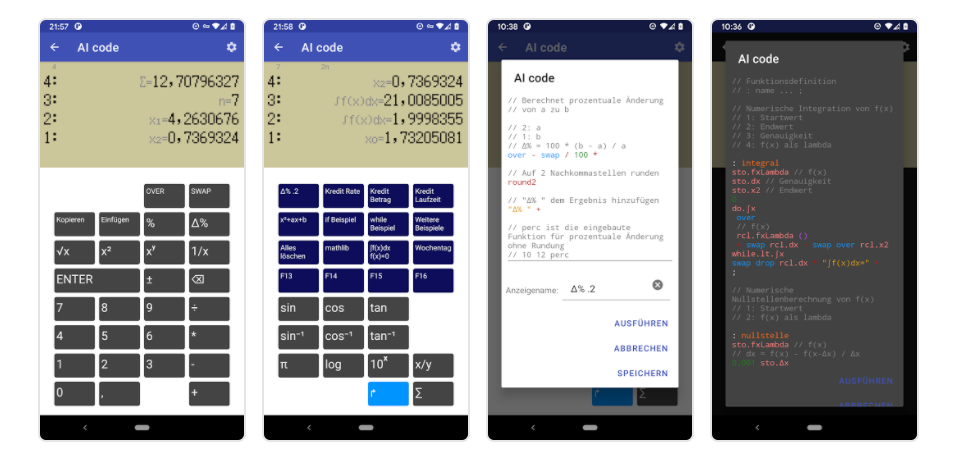
AI code is a programmable calculator for Android.
AI code supports Forth-style definitions, variables, code import and lamda expressions. The latest update adds Vector/Matrix operations and statistics. Along with the color coded editor it is a new concept of using a programmable calculator.// Vector, Matrix in variable [ 1 2 3 ] "Vector " + sto.v1 [ [ 3 2 1 ] [ 1 0 2 ] ] "Matrix " + sto.m1 rcl.v1 rcl.m1 // Matrix multiplication [ [ 1 2 ] [ 0 1 ] [ 4 0 ] ] [ [ 3 2 1 ] [ 1 0 4 ] ] * // solve system of equations [ [ 1 2 3 ] [ 1 1 1 ] [ 3 3 1 ] ] [ 2 2 0 ] solve // Matrix invert [ [ 1 2 0 ] [ 2 4 1 ] [ 2 1 0 ] ] invSee the pre installed scripts for more examples.
-
Project AI code
AI code is a programmable calculator for Android.
It is also available within the StockRoom App to support financial calculations.AI code supports Forth-style definitions, variables and lamda expressions. As an engineer, I have been using a HP calculator since University and this is how I imagine a modern programmable calculator. The app comes preloaded with lots of example code to try out.
Use :clearcode to remove all examples, and :defaultcode to restore all examples. See also Project AI code update and AI code calculus examples
AI code @github
Observe the secret message to find out what AI stands for and enjoy the psychedelic dots while staring at the keys.
-
Project StockRoom
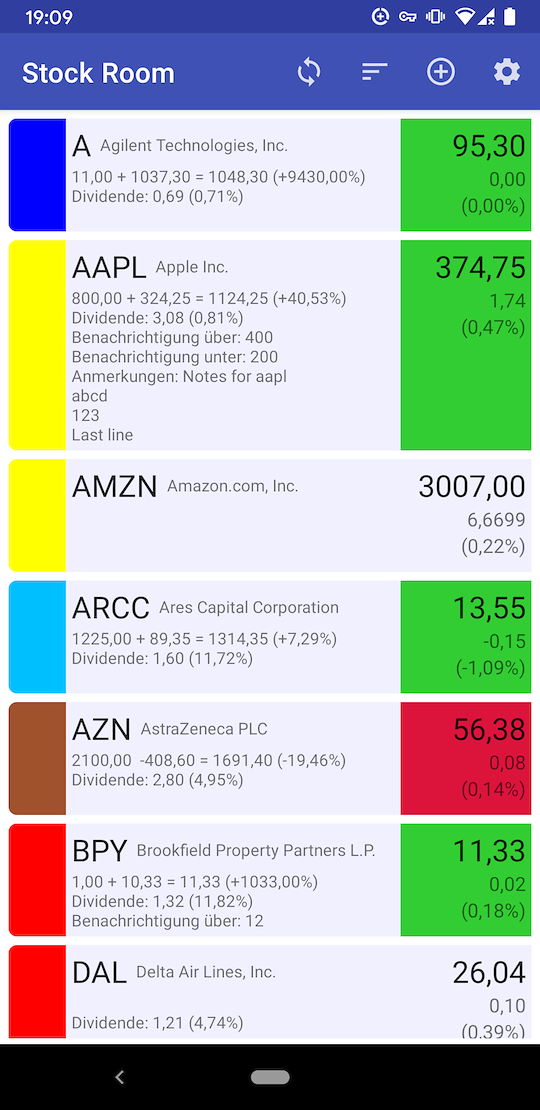
StockRoom is a financial stock tracking app for Android which I have developed with some talented young engineers.

It was a great learning experience using the most recent Android APIs and the Kotlin language to create a native app. The code structure is clean and simple and is using LiveData technology to present the stock data in all the activity screens.
See StockRoom @github
-
Android Room database migration and testing in Kotlin
The Android Room database is a popular choice for mobile apps. For the planned improvement for the StockTicker app, the database needs to be upgraded from version 1 to 2. This requires a migration path with a test case for the upgrade from version 1 to version 2.
To get started, the migration test is using the Android migration test helper. It is best to start with the test cases first to ensure a proper data base migration.
@RunWith(RobolectricTestRunner::class)
class MigrationTest {
  private val TEST_DB = "quotes-db"

  val helper: MigrationTestHelper = MigrationTestHelper(
      InstrumentationRegistry.getInstrumentation(),
      QuotesDB::class.java.canonicalName,
      FrameworkSQLiteOpenHelperFactory()
  )
The test case first creates a database with version 1 and adds sample values, either using the ContentValues, or by using the SQL INSERT statement.
  @Test
  @Throws(IOException::class)
  fun migrate1To2() {
    helper.createDatabase(TEST_DB, 1)
        .apply {
          val values = ContentValues()
          values.put("symbol", "ktln")
          values.put("name", "kotlin inc")
          values.put("last_trade_price", 42)
          values.put("change_percent", 4.2)
          values.put("change", 1.764)
          values.put("exchange", "NYSE")
          values.put("currency", "EURO")
          values.put("description", "desc")

          this.insert("QuoteRow", SQLiteDatabase.CONFLICT_REPLACE, values)
          this.execSQL(
              "INSERT INTO QuoteRow (symbol, name, last_trade_price, change_percent, change, exchange, currency, description) VALUES ('a1', '123', 1.2, 1.1, 1.0, 'e1', 'Euro', 'desc1');"
          )
          this.execSQL(
              "INSERT INTO QuoteRow (symbol, name, last_trade_price, change_percent, change, exchange, currency, description) VALUES ('a2', '456', 2.2, 2.1, 2.0, 'e2', 'Euro', 'desc2');"
          )

          this.execSQL("CREATE TABLE IF NOT EXISTS `PropertiesRow` (`id` INTEGER PRIMARY KEY AUTOINCREMENT, `quote_symbol` TEXT NOT NULL, `notes` TEXT NOT NULL, `alert_above` REAL NOT NULL, `alert_below` REAL NOT NULL)")

          // Prepare for the next version.
          this.close()
        }
Once the database is created, the migration test runs the migration path to version 2.
    // Re-open the database with version 2 and provide
    // MIGRATION_1_2 as the migration process.
    val db = helper.runMigrationsAndValidate(TEST_DB, 2, true, MIGRATION_1_2)
The next step is to test the content of the converted database.
    // MigrationTestHelper automatically verifies the schema changes,
    // but you need to validate that the data was migrated properly.
    val cursor = db.query("SELECT * FROM QuoteRow")
    cursor.moveToFirst()

    // Expect 10 columns
    assertThat(cursor.columnCount, Matchers.equalTo(10))

    // Expect 3 entries
    assertThat(cursor.count, Matchers.equalTo(3))

    var stringEntry: String = ""
    var floatEntry: Float = 0.0f

    stringEntry = cursor.getString(cursor.getColumnIndex("symbol"))
    assertThat(stringEntry, Matchers.equalTo("ktln"))

    stringEntry = cursor.getString(cursor.getColumnIndex("name"))
    assertThat(stringEntry, Matchers.equalTo("kotlin inc"))

    floatEntry = cursor.getFloat(cursor.getColumnIndex("last_trade_price"))
    assertThat(floatEntry, Matchers.equalTo(42f))

    floatEntry = cursor.getFloat(cursor.getColumnIndex("change_percent"))
    assertThat(floatEntry, Matchers.equalTo(4.2f))

    floatEntry = cursor.getFloat(cursor.getColumnIndex("change"))
    assertThat(floatEntry, Matchers.equalTo(1.764f))

    stringEntry = cursor.getString(cursor.getColumnIndex("exchange"))
    assertThat(stringEntry, Matchers.equalTo("NYSE"))

    stringEntry = cursor.getString(cursor.getColumnIndex("currency"))
    assertThat(stringEntry, Matchers.equalTo("EURO"))

    // description column is removed
    val index = cursor.getColumnIndex("description")
    assertThat(index, Matchers.equalTo(-1))
  }
The actual migration is done by the creating a table of the new version, copying over the content from the table of the old version.
  val MIGRATION_1_2 = object : Migration(1, 2) {
    override fun migrate(database: SupportSQLiteDatabase) {
      val TABLE_NAME = "QuoteRow"
      val TABLE_NAME_TEMP = "new_QuoteRow"

      database.execSQL(
          """
          CREATE TABLE `${TABLE_NAME_TEMP}` (
            symbol TEXT NOT NULL,
            name TEXT NOT NULL,
            last_trade_price REAL NOT NULL,
            change_percent REAL NOT NULL,
            change REAL NOT NULL,
            exchange TEXT NOT NULL,
            currency TEXT NOT NULL,
            is_post_market INTEGER NOT NULL,
            annual_dividend_rate REAL NOT NULL,
            annual_dividend_yield REAL NOT NULL,
            PRIMARY KEY(symbol)
          )
          """.trimIndent()
      )
      database.execSQL(
          """
          INSERT INTO `${TABLE_NAME_TEMP}` (symbol, name, last_trade_price, change_percent, change, exchange, currency, is_post_market, annual_dividend_rate, annual_dividend_yield)
          SELECT symbol, name, last_trade_price, change_percent, change, exchange, currency, 0, 0, 0 FROM `${TABLE_NAME}`
          """.trimIndent()
      )
      database.execSQL("DROP TABLE `${TABLE_NAME}`")
      database.execSQL("ALTER TABLE `${TABLE_NAME_TEMP}` RENAME TO `${TABLE_NAME}`")

      database.execSQL("CREATE TABLE IF NOT EXISTS `PropertiesRow` (`id` INTEGER PRIMARY KEY AUTOINCREMENT, `quote_symbol` TEXT NOT NULL, `notes` TEXT NOT NULL, `alert_above` REAL NOT NULL, `alert_below` REAL NOT NULL)")
    }
  }
}
The migration function is then used by the database builder to perform the upgrade.
return Room.databaseBuilder(
    context.applicationContext,
    QuotesDB::class.java, "quotes-db")
    .addMigrations(MIGRATION_1_2)
    .build()
To ensure you have the latest schema available, add
exportSchema = trueto the Database definition.@Database( entities = [QuoteRow::class, HoldingRow::class, PropertiesRow::class], version = 2, exportSchema = true )If you run into the problem that the automatic generated schema is not found while the test is run, add this to the app/build.gradle.
  sourceSets {
     debug.assets.srcDirs += files("$projectDir/schemas".toString())
  }